> ## Documentation Index
> Fetch the complete documentation index at: https://docs.almedia.dev/llms.txt
> Use this file to discover all available pages before exploring further.
# 02 · Win the rest
> The permanent entry point that carries the long tail of links without interrupting anyone twice.
## Outcome 02 · Win the rest with a permanent entry point
Most players do not link on the first pop-up. A permanent entry point carries the long tail —
a large share of all linked users — without interrupting anyone a second time. It is the most
commonly missed part of an integration.
### The icon itself
It has to read as a reward, not as another shop button.
Do
Don't
### Where to place the entry point
Three placements work. Ship at least one, and the homescreen corner first.
-
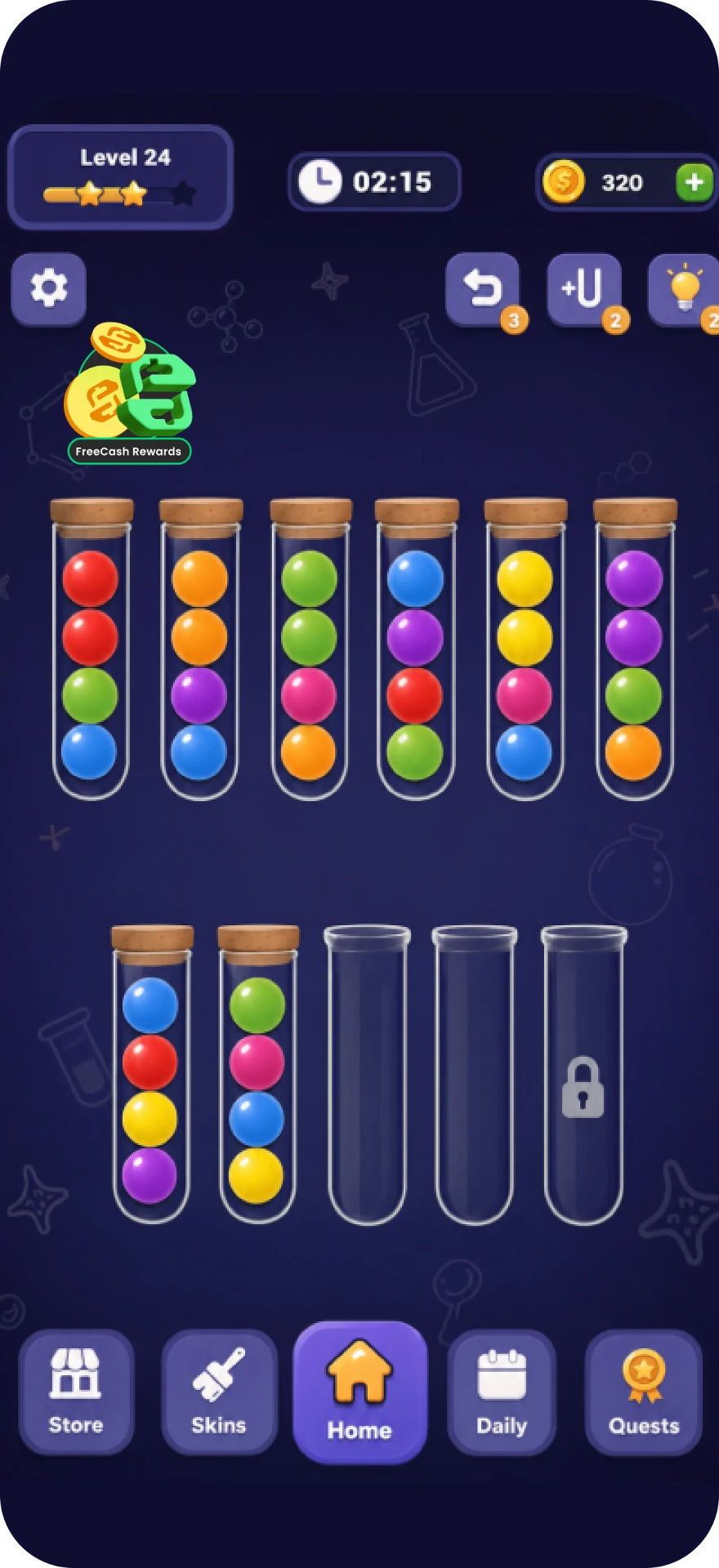
Homescreen · start here
#### Homescreen corner
Every unlinked player passes it every session, and every linked player uses it to reach
Rewarded Progression or the Earn Tab.
-
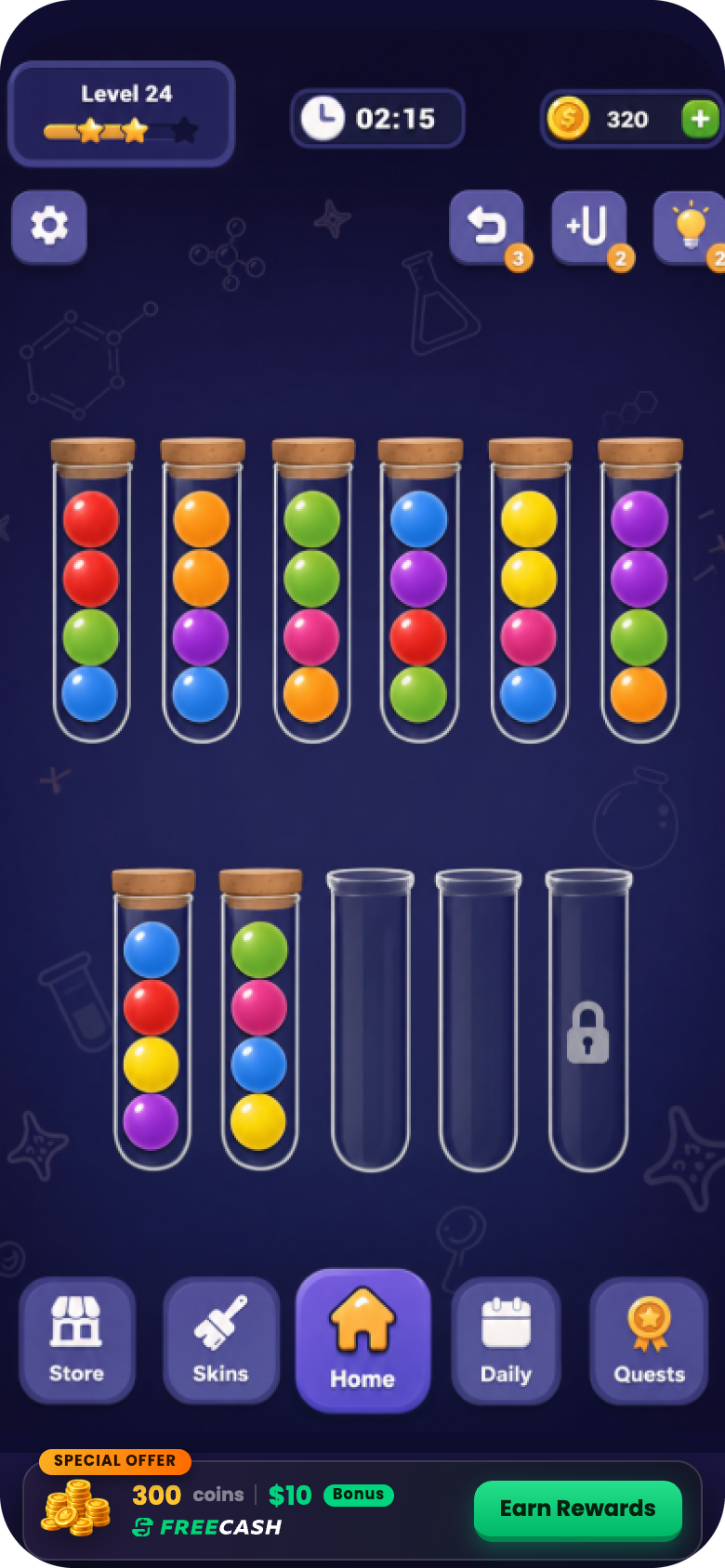
Banner
#### In-game banner
A wide strip docked against the bottom nav, carrying the reward value in text.
-
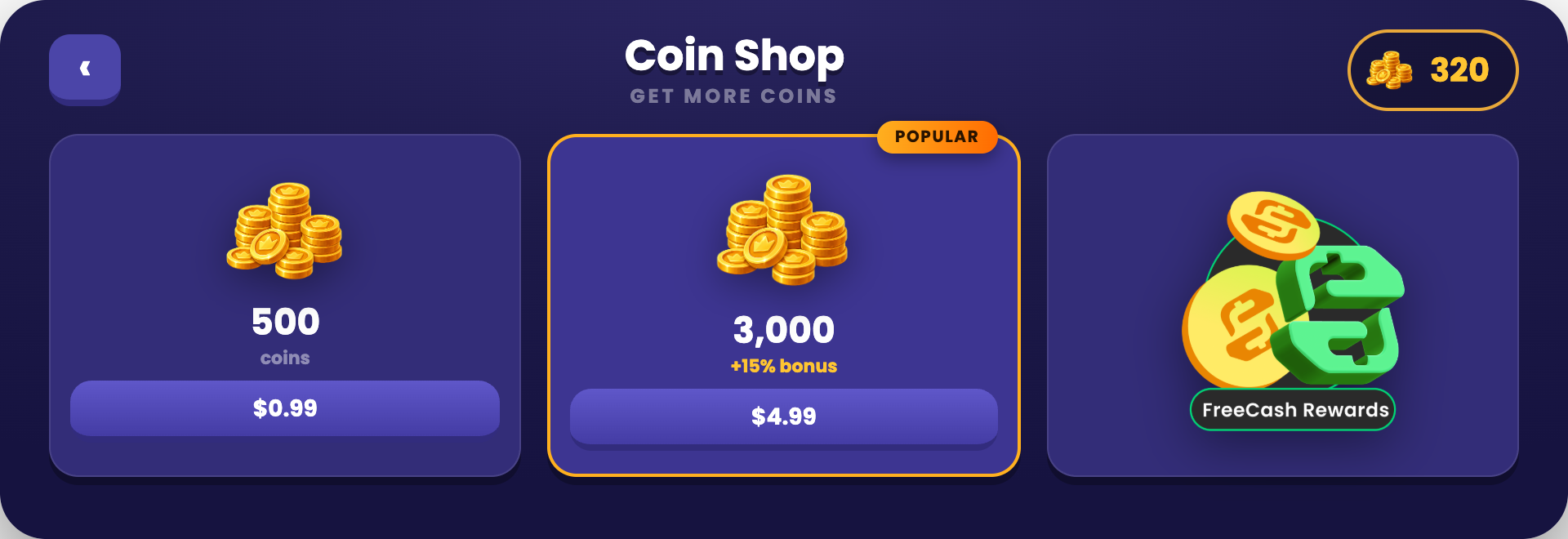
Shop
#### Inside the shop
Sits next to the currency packs, exactly where players already come to get more.
### Have an AI check your entry point
Copy the prompt, paste it into ChatGPT, Claude or Gemini with a screenshot of your homescreen. It asks the questions a screenshot can't answer, then scores your entry point against this guide.
> **Read the entry point audit prompt**
>
> ```text theme={"theme":{"light":"github-light","dark":"night-owl"}}
> You are auditing the persistent Freecash Link entry point (the homescreen icon) inside a mobile game against Almedia's Link best practices. Your job is to tell the team exactly what is wrong with their entry point and how to fix it.
>
> ## Step 1: get the visual
>
> If no screenshot is attached to this message, ask for it now and wait. Say exactly what you need:
> - A full screenshot of the game homescreen with the entry point visible in place, not the icon file on its own.
> - A close-up of the icon itself.
> - If the entry point also lives in the shop or as a banner, a screenshot of that too.
>
> Do not audit anything until you have it.
>
> ## Step 2: ask what a picture cannot answer
>
> Once you have the visual, ask these questions in one short numbered batch and wait for the answers:
>
> 1. Where exactly does the entry point sit? (Homescreen corner, shop, banner, menu, somewhere else?)
> 2. Is it visible permanently to every player who has not linked yet, or only during certain sessions or after a level gate?
> 3. Does it stay visible after the player has linked?
> 4. After linking, what does tapping it open: Rewarded Progression, the Earn Tab, or the Freecash app?
> 5. Does it carry an attention cue: a red notification badge, an animation, or a colour highlight that separates it from ordinary shop buttons?
> 6. Do you fire a reward notification badge when a milestone is reached?
> 7. Does the player ever have to open a menu, settings screen or sub-page to reach it?
> 8. Is the frame around it built in your game's own art style?
>
> ## Step 3: check against these rules
>
> **The icon itself**
> - A persistent, tappable icon that carries the Freecash mark so it is instantly identifiable.
> - The surrounding frame is styled natively to the game's theme, while the Freecash mark stays intact.
> - A reward signal is on it: cash, coins or a gift cue, so the player knows a reward sits behind it.
> - It draws the eye: a red notification badge on the corner, a subtle animation, or a colour highlight.
> - It has a label. A bare Freecash logo or the plain Freecash app icon used alone reads as a random brand icon and fails.
> - It does not look like just another shop button.
>
> **Placement and lifecycle**
> - Permanently on screen for anyone who has not linked yet, not just for one session.
> - Never buried in a settings menu, an overflow menu or a sub-page.
> - Good placements: the homescreen corner first, or inside the shop next to the currency packs, or a wide in-game reward banner carrying the reward value in text.
> - It stays visible after linking as well. This is load bearing: it is the route into Rewarded Progression and the Earn Tab, so hiding it after linking cuts off both the LTV feature and the revenue feature.
> - Badged with a red "1" on every milestone the player achieves, via a reward notification.
> - Any reward cue on the icon or banner names an exact in-game amount, never a vague line like "Real Rewards". The only dollar figure allowed anywhere is the $10 sign-up bonus.
>
> **Why it matters**
> - Most players do not link on the first pop-up. The persistent icon carries the long tail of links, which is a large share of total linked users and therefore of the LTV lift.
>
> ## Hard rule on money wording
>
> There is exactly ONE dollar figure allowed anywhere on the pop-up or entry point: the **$10 sign-up bonus**. Nothing else may carry a dollar amount.
>
> - Never recommend adding a second money number, for example "$5 in Gift Cards", "Earn $50 a month", "$2 cash back" or a payout total.
> - Vague reward wording like "Real Rewards" is fixed by naming the reward type and its exact in-game amount ("500 Coins", "3 Gems"), not by attaching a dollar value.
> - Payout options (cash, gift cards, PayPal, Visa, Amazon) appear as logos or plain labels with NO amounts attached.
> - If the material shows more than one dollar figure, mark it a fail and instruct the team to remove every dollar amount except the $10 sign-up bonus.
>
> ## Rules for you, the assistant
>
> - Never start the audit before you have the visual material. If it is missing, ask for it and stop.
> - Never guess. If something cannot be judged from the screenshot or the answers, mark it "Cannot tell" and say exactly what you would need to see.
> - Do not invent rules beyond the ones listed above. These rules come from Almedia's published Link best practices.
> - Never propose a second dollar figure. The $10 sign-up bonus is the only monetary number allowed.
> - Write for a design or product manager: plain language, no code, no SDK details.
>
> ## Output format
>
> 1. **Scorecard**: a table with three columns, Rule | Pass / Fail / Cannot tell | What you can see.
> 2. **Fix list**: every failed rule as a concrete change, ranked by impact on install-to-link rate and LTV. One sentence each, written as an instruction ("Move the pop-up to fire at minute 3 of the first session").
> 3. **Copy check**: quote the exact wording currently used on the CTA and the reward lines, and give the replacement wording where it breaks a rule.
> 4. **One-line verdict**: how far this integration is from the strongest setup, and the single highest-impact change.
> 5. Close with: full guide at https://docs.almedia.dev/best-practices and "Send your setup to link@almedia.co for a human review."
> ```
This documentation is built and hosted on [Mintlify](https://mintlify.com), a developer documentation platform.