# Best practices
Source: https://docs.almedia.dev/overview/best-practices
The patterns behind a high install-to-link rate and a clear LTV lift for linked users — pop-up timing and design, the homescreen entry point, Rewarded Progression, the Earn Tab and a pre-launch checklist.
[AI prompt: audit my pop-up](#have-an-ai-check-your-pop-up-design)
[AI prompt: audit my entry point](#have-an-ai-check-your-entry-point)
How to read this guide
This is a layout guide, you make it game native
Every example is illustrated with Freecash art to show the structure. Rebuild it
**game native**: your fonts, colours, frames, art style. Keep only the Freecash
logo at certain touch points, and keep the exact reward values intact.
## Outcome 01 · How to maximize your install-to-link ratio
Three levers decide how many installs turn into linked accounts: when the pop-up fires, what it
says, and whether players can still find the offer later.
### Pop-up design
The design of the pop-up should be native to your game — font, style, frames. The example
artwork only illustrates which components it should include.
Do
Don't
#### Copy you can ship as-is
#### Social proof
- “Join millions of players already earning daily.”
- “Join a community of over 80 million players earning real rewards.”
#### CTA
- “Earn Rewards”
- “Start earning rewards”
- “Link Account & Get Rewards”
Bonus tip
Make the in-game reward escalating: raise it on every re-show after a dismissal, up to one
final best offer.
### Where to place the pop-up
Timing alone separates the strongest integrations from the average ones. The same creative
performs very differently depending on when it fires.
Do
Don't
### Have an AI check your pop-up design
Copy the prompt, paste it into ChatGPT, Claude or Gemini with a screenshot of your pop-up. It asks for what it needs, then scores your pop-up against every rule in this guide.
> **Read the pop-up audit prompt**
>
> ```text theme={"theme":{"light":"github-light","dark":"night-owl"}}
> You are auditing the Freecash Link pop-up inside a mobile game against Almedia's Link best practices. Your job is to tell the team exactly what is wrong with their pop-up and how to fix it.
>
> ## Step 1: get the visual
>
> If no screenshot or screen recording of the pop-up is attached to this message, ask for it now and wait. Say exactly what you need:
> - A full screen capture of the pop-up as a player sees it, gameplay behind it included.
> - Ideally also a short screen recording showing the moment it appears.
>
> Do not audit anything until you have it.
>
> ## Step 2: ask what a picture cannot answer
>
> Once you have the visual, ask these questions in one short numbered batch and wait for the answers:
>
> 1. How many minutes into the player's very first session does the pop-up first appear?
> 2. Does it appear on its own, or does the player have to tap an icon, menu or shop tab?
> 3. If the player dismisses it, what brings it back? (Every few levels? Every X minutes of play time? Only once per session? Once per install?)
> 4. Can it fire directly after a rewarded ad or an interstitial?
> 5. What percentage of users currently see it?
> 6. Is dismissal blocked for the first few seconds, and is a countdown shown?
> 7. When a player links, is the in-game currency reward shown on the pop-up actually granted, and how soon?
> 8. Is the pop-up built in your game's own fonts, colours and UI frames, or is it Freecash-branded artwork?
>
> ## Step 3: check against these rules
>
> **Timing and placement**
> - Appears within the first 2-5 minutes of play time, inside the very first session.
> - Force-shown: it appears on its own, no tap required.
> - Reshown every few levels, and at most once every 30 minutes of play time, to any player who has not linked yet.
> - Rolled out to at least 90% of users.
> - Never fired straight after a rewarded ad or an interstitial.
> - Not capped to "once per session" or "once per install".
> - The surrounding screen is quiet: the pop-up is clearly the only thing on screen.
>
> **Design**
> - Covers at least half the screen, with the gameplay behind it dimmed out. A small card over barely dimmed gameplay fails.
> - Built game native: the game's own fonts, colours, button shapes and art style. Only the Freecash mark and the exact reward values stay as-is.
> - Dismissal blocked for the first 5 seconds, shown as a small countdown next to a greyed-out close button.
> - The $10 sign-up bonus is stated outright in plain text. This is the single most impactful element.
> - The in-game currency reward for linking (coins, gems, tickets) is shown on the banner, and actually granted on linking.
> - Real-world payout options are shown as logos or plain labels (cash, gift cards, PayPal / Visa / Amazon) with no dollar amounts attached, so the value reads as real money.
> - Exactly one reward-led CTA. Shippable wording: "Earn Rewards", "Start earning rewards", "Link Account & Get Rewards".
> - No "Sign Up", "Link & SignUp" or "Link to Freecash" wording. Those describe an action, not a benefit.
> - No second competing button such as "Check Link" next to the main CTA.
> - The Freecash icon is present so the offer is recognisable and trusted.
> - One social-proof or trust-signal line is present. Shippable wording: "Join millions of players already earning daily." or "Join a community of over 80 million players earning real rewards."
> - Uncluttered: a balance of icons and short text, never a wall of copy.
> - No vague rewards ("Coins for playing", "Cash bonus", "Real Rewards"). Every reward is named with its exact in-game amount, for example "500 Coins".
> - Only one dollar figure on the whole pop-up: the $10 sign-up bonus.
>
> ## Hard rule on money wording
>
> There is exactly ONE dollar figure allowed anywhere on the pop-up or entry point: the **$10 sign-up bonus**. Nothing else may carry a dollar amount.
>
> - Never recommend adding a second money number, for example "$5 in Gift Cards", "Earn $50 a month", "$2 cash back" or a payout total.
> - Vague reward wording like "Real Rewards" is fixed by naming the reward type and its exact in-game amount ("500 Coins", "3 Gems"), not by attaching a dollar value.
> - Payout options (cash, gift cards, PayPal, Visa, Amazon) appear as logos or plain labels with NO amounts attached.
> - If the material shows more than one dollar figure, mark it a fail and instruct the team to remove every dollar amount except the $10 sign-up bonus.
>
> ## Rules for you, the assistant
>
> - Never start the audit before you have the visual material. If it is missing, ask for it and stop.
> - Never guess. If something cannot be judged from the screenshot or the answers, mark it "Cannot tell" and say exactly what you would need to see.
> - Do not invent rules beyond the ones listed above. These rules come from Almedia's published Link best practices.
> - Never propose a second dollar figure. The $10 sign-up bonus is the only monetary number allowed.
> - Write for a design or product manager: plain language, no code, no SDK details.
>
> ## Output format
>
> 1. **Scorecard**: a table with three columns, Rule | Pass / Fail / Cannot tell | What you can see.
> 2. **Fix list**: every failed rule as a concrete change, ranked by impact on install-to-link rate and LTV. One sentence each, written as an instruction ("Move the pop-up to fire at minute 3 of the first session").
> 3. **Copy check**: quote the exact wording currently used on the CTA and the reward lines, and give the replacement wording where it breaks a rule.
> 4. **One-line verdict**: how far this integration is from the strongest setup, and the single highest-impact change.
> 5. Close with: full guide at https://dev.almedia.co/overview/best-practices and "Send your setup to link@almedia.co for a human review."
> ```
### Homescreen icon
Most players don't link on the first pop-up. This is what brings them back without interrupting
them again — and it is the most commonly missed part of an integration.
Do
Don't
### Where to place the entry point
Three placements work. Ship at least one, and the homescreen corner first.
-
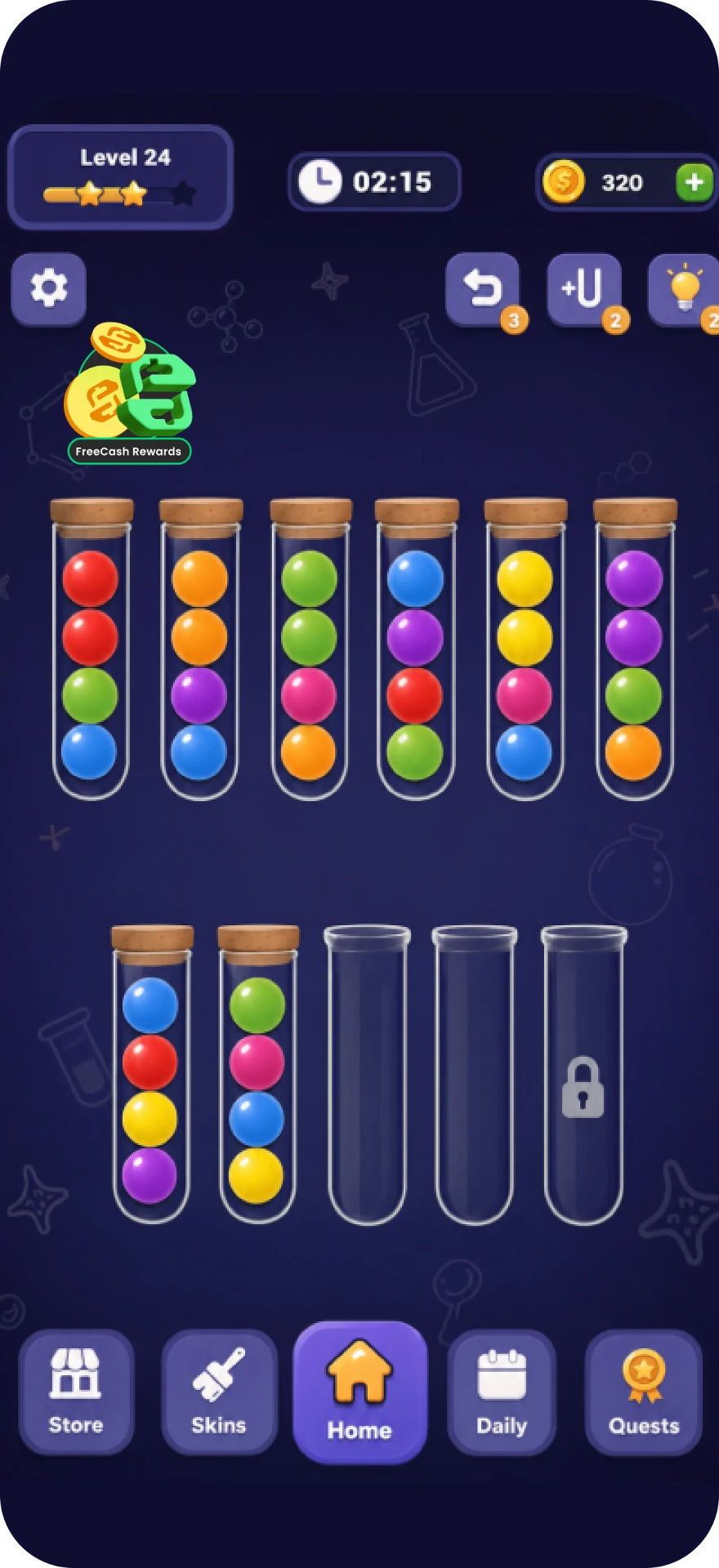
Homescreen · start here
#### Homescreen corner
Every unlinked player passes it every session, and every linked player uses it to reach
Rewarded Progression or the Earn Tab.
-
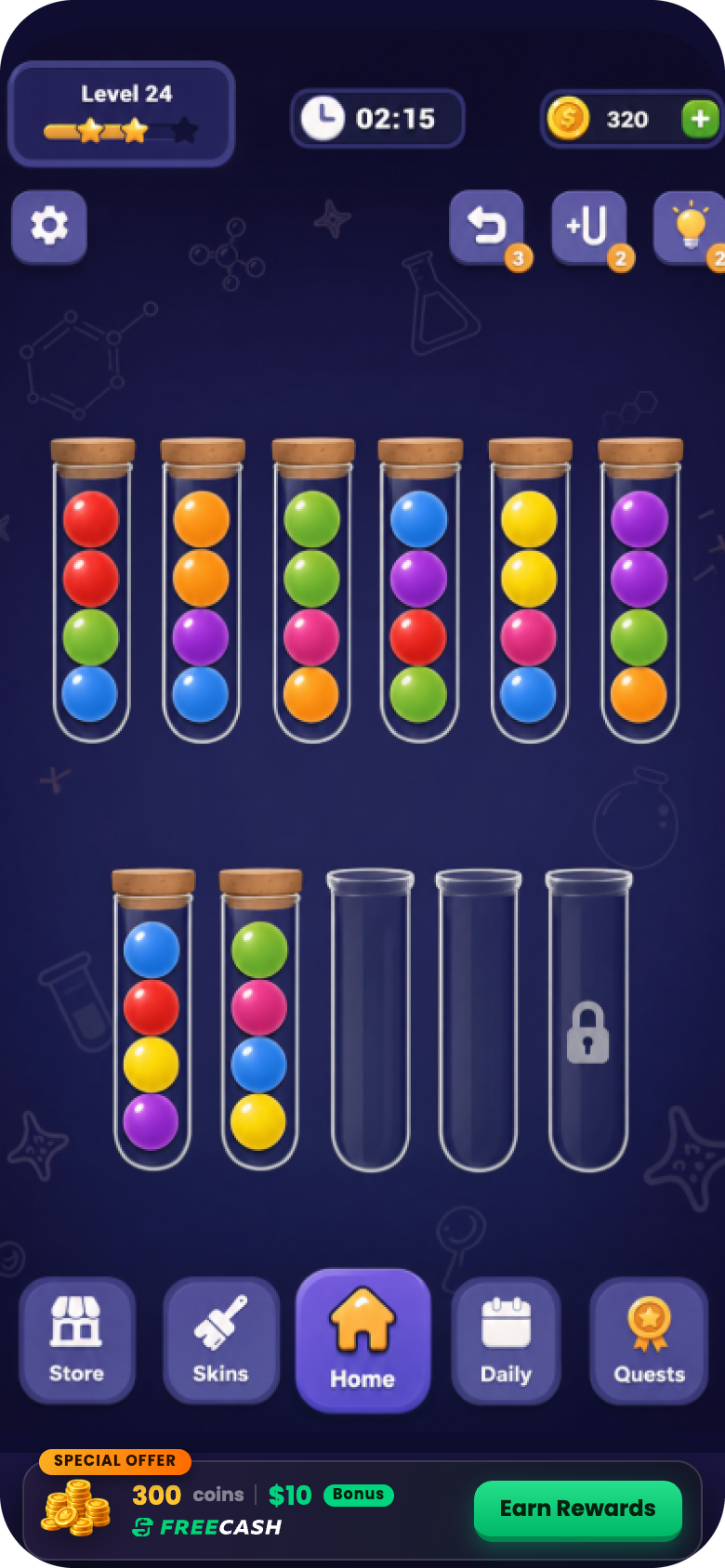
Banner
#### In-game banner
A wide strip docked against the bottom nav, carrying the reward value in text.
-
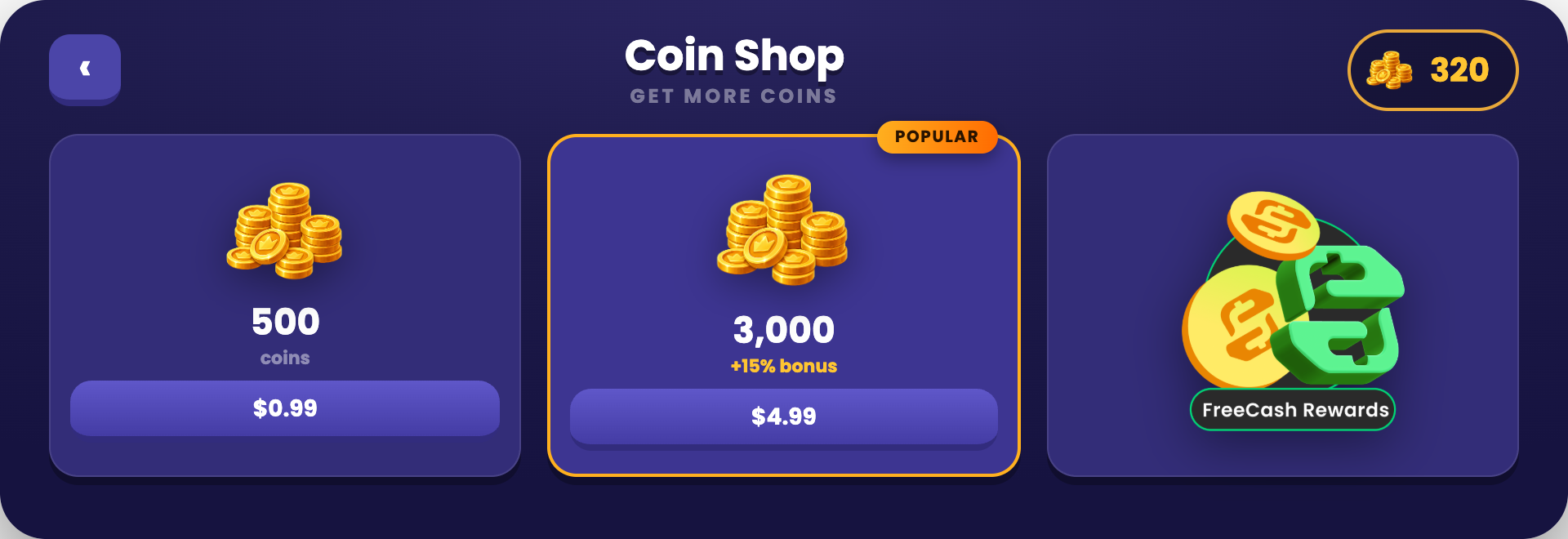
Shop
#### Inside the shop
Sits next to the currency packs, exactly where players already come to get more.
### Have an AI check your entry point
Copy the prompt, paste it into ChatGPT, Claude or Gemini with a screenshot of your homescreen. It asks the questions a screenshot can't answer, then scores your entry point against this guide.
> **Read the entry point audit prompt**
>
> ```text theme={"theme":{"light":"github-light","dark":"night-owl"}}
> You are auditing the persistent Freecash Link entry point (the homescreen icon) inside a mobile game against Almedia's Link best practices. Your job is to tell the team exactly what is wrong with their entry point and how to fix it.
>
> ## Step 1: get the visual
>
> If no screenshot is attached to this message, ask for it now and wait. Say exactly what you need:
> - A full screenshot of the game homescreen with the entry point visible in place, not the icon file on its own.
> - A close-up of the icon itself.
> - If the entry point also lives in the shop or as a banner, a screenshot of that too.
>
> Do not audit anything until you have it.
>
> ## Step 2: ask what a picture cannot answer
>
> Once you have the visual, ask these questions in one short numbered batch and wait for the answers:
>
> 1. Where exactly does the entry point sit? (Homescreen corner, shop, banner, menu, somewhere else?)
> 2. Is it visible permanently to every player who has not linked yet, or only during certain sessions or after a level gate?
> 3. Does it stay visible after the player has linked?
> 4. After linking, what does tapping it open: Rewarded Progression, the Earn Tab, or the Freecash app?
> 5. Does it carry an attention cue: a red notification badge, an animation, or a colour highlight that separates it from ordinary shop buttons?
> 6. Do you fire a reward notification badge when a milestone is reached?
> 7. Does the player ever have to open a menu, settings screen or sub-page to reach it?
> 8. Is the frame around it built in your game's own art style?
>
> ## Step 3: check against these rules
>
> **The icon itself**
> - A persistent, tappable icon that carries the Freecash mark so it is instantly identifiable.
> - The surrounding frame is styled natively to the game's theme, while the Freecash mark stays intact.
> - A reward signal is on it: cash, coins or a gift cue, so the player knows a reward sits behind it.
> - It draws the eye: a red notification badge on the corner, a subtle animation, or a colour highlight.
> - It has a label. A bare Freecash logo or the plain Freecash app icon used alone reads as a random brand icon and fails.
> - It does not look like just another shop button.
>
> **Placement and lifecycle**
> - Permanently on screen for anyone who has not linked yet, not just for one session.
> - Never buried in a settings menu, an overflow menu or a sub-page.
> - Good placements: the homescreen corner first, or inside the shop next to the currency packs, or a wide in-game reward banner carrying the reward value in text.
> - It stays visible after linking as well. This is load bearing: it is the route into Rewarded Progression and the Earn Tab, so hiding it after linking cuts off both the LTV feature and the revenue feature.
> - Badged with a red "1" on every milestone the player achieves, via a reward notification.
> - Any reward cue on the icon or banner names an exact in-game amount, never a vague line like "Real Rewards". The only dollar figure allowed anywhere is the $10 sign-up bonus.
>
> **Why it matters**
> - Most players do not link on the first pop-up. The persistent icon carries the long tail of links, which is a large share of total linked users and therefore of the LTV lift.
>
> ## Hard rule on money wording
>
> There is exactly ONE dollar figure allowed anywhere on the pop-up or entry point: the **$10 sign-up bonus**. Nothing else may carry a dollar amount.
>
> - Never recommend adding a second money number, for example "$5 in Gift Cards", "Earn $50 a month", "$2 cash back" or a payout total.
> - Vague reward wording like "Real Rewards" is fixed by naming the reward type and its exact in-game amount ("500 Coins", "3 Gems"), not by attaching a dollar value.
> - Payout options (cash, gift cards, PayPal, Visa, Amazon) appear as logos or plain labels with NO amounts attached.
> - If the material shows more than one dollar figure, mark it a fail and instruct the team to remove every dollar amount except the $10 sign-up bonus.
>
> ## Rules for you, the assistant
>
> - Never start the audit before you have the visual material. If it is missing, ask for it and stop.
> - Never guess. If something cannot be judged from the screenshot or the answers, mark it "Cannot tell" and say exactly what you would need to see.
> - Do not invent rules beyond the ones listed above. These rules come from Almedia's published Link best practices.
> - Never propose a second dollar figure. The $10 sign-up bonus is the only monetary number allowed.
> - Write for a design or product manager: plain language, no code, no SDK details.
>
> ## Output format
>
> 1. **Scorecard**: a table with three columns, Rule | Pass / Fail / Cannot tell | What you can see.
> 2. **Fix list**: every failed rule as a concrete change, ranked by impact on install-to-link rate and LTV. One sentence each, written as an instruction ("Move the pop-up to fire at minute 3 of the first session").
> 3. **Copy check**: quote the exact wording currently used on the CTA and the reward lines, and give the replacement wording where it breaks a rule.
> 4. **One-line verdict**: how far this integration is from the strongest setup, and the single highest-impact change.
> 5. Close with: full guide at https://dev.almedia.co/overview/best-practices and "Send your setup to link@almedia.co for a human review."
> ```
## Outcome 02 · How to maximize LTV with Rewarded Progression
SDK 1.1+ needed
Rewarded Progression lives inside your game. The player sees their progress and their rewards
without ever opening Freecash, which is what keeps them playing and cuts churn.
### User flow after linking
Pay out loud, then show them where the progression lives.
### Badge every milestone
A reward notification is what pulls the player back into progression.
Bonus tip
Badge the icon with a red “1” on every milestone the user achieves, using a reward
notification. [Technical guide for this](https://github.com/almedia-tm/almedia-sdk/blob/main/Documentation~/integration-guide.md#reward-notifications)
## Outcome 03 · How to maximize revenue with the Earn Tab
SDK 1.1+ needed
The Earn Tab pays you a \$3 CPA for every completed offer. It is an additional feature for
already-linked users.
### User flow for the Earn Tab
Players will not find the Earn Tab on their own, so it gets its own launch moment: a dedicated
pop-up, one short tutorial, then the same Freecash homescreen icon as the permanent way back.
### Earn Tab pop-up
Same rules as the link pop-up: exact reward stated, one CTA, no wall of text.
Do
Don't
Launching the Earn Tab
Fill in the short Earn Tab survey so we have every asset we need to set it up for you.
[Start the Earn Tab survey](https://link-asset-hub.lovable.app/earn-tab-survey)
## Full user flow from start to end
The whole journey in one recording: the pop-up firing in the first session, the link and Freecash
sign-up, back into the game for the in-game payout, the homescreen icon, and finally Rewarded
Progression.
## Checklist
Every box ticked is the strongest setup we know of today for install-to-link rate and LTV per
linked player. Each core box is worth 10 Link Coins; the Earn Tab is a bonus stage worth 15 a box.
/ Link Coins
core + bonus
Submit your integration. We will give you feedback.
Send us your Link setup and we will review it against everything on this page. Running your own
A/B tests? Send those results too.
[Submit your integration](https://link-asset-hub.lovable.app/survey)
Questions: [link@almedia.co](mailto:link@almedia.co)
# Get started
Source: https://docs.almedia.dev/overview/get-started
The order things happen in, who owns each stage, and what runs in parallel.
This page is the map: what happens, in what order, and who owns it. Every stage links to the
page that carries the detail.
Most of the calendar time is the commercial and attribution setup, not the build. Two stages
run in parallel, which is what keeps it short.
## The seven stages
**1. Scope it** — you and your account manager.
Which experiences you want, and a check that your game is on Unity 2022.3 LTS or newer.
See [experiences](/publisher/experiences).
**2. Set up attribution** — your growth or UA team.
**Start this now.** It does not depend on anything below it, and it is the stage most likely
to be waiting on someone else. See [MMP setup](/publisher/mmp).
**3. Send what Almedia needs** — you.
App IDs, MMP events, and a deep link if you have one. The full list is on
[prerequisites](/publisher/prerequisites).
**4. Receive your keys** — Almedia.
Your campaign and offers are created, and your integration keys are issued.
**5. Integrate** — your engineers.
About **15 minutes** using the bundled UI. Building your own UI instead is measured in days
rather than weeks. See the [integration guide](/technical/integration-guide).
**6. Test and review** — your QA, with feedback from Almedia.
The SDK ships an editor mock that drives every state from inside the Unity editor, so most
testing needs no device build. See [For QA](/qa).
**7. Go live.**
> [!WARNING]
>
> Stage 6 only means something after stage 4. Testing before the campaign exists and the keys
> are issued proves nothing, and it is where most "it doesn't work" reports come from.
## Where to go next
> **[I am building the integration](/technical/integration-guide)**
>
> Straight to the SDK and the integration guide.
> **[I am getting us ready to launch](/publisher/prerequisites)**
>
> Accounts, attribution, and the decisions to settle before engineering starts.
**Stuck at any stage? Your account manager is the route.** They issue the keys, create the
campaign, review your screenshots, and pull in Almedia engineers when the question is
technical. Asking early is cheaper than testing against a campaign that does not exist yet.
No account manager yet, or need a written record? Email `link@almedia.co`.
# Glossary
Source: https://docs.almedia.dev/overview/glossary
The terms used across this site, in plain language — attribution, postbacks, the three Link experiences, and the measures Almedia reports on.
Integration work spans three vocabularies: yours, your MMP's, and Almedia's. This page is the
shared one. Every entry links to the page that covers it properly.
## Attribution
Working out which campaign a player came from. Your MMP does this. Almedia Link does not need
a player to be attributed — see [unattributed postback](#unattributed-postback).
## CPA
Cost per action. The fixed amount Almedia pays for one completed action — most often a
verified link. Rates are agreed with your account manager, not published.
See [how revenue works](/overview/how-revenue-works).
## Deep link
A link that opens a specific place inside your game rather than the store page. Link uses one
to return a player to your game after they finish linking.
See [prerequisites](/publisher/prerequisites).
## Earn Tab
See [Offers](#offers-earn-tab).
## Freecash
The rewards platform players link their account to. Almedia funds the rewards paid there —
they do not come out of your economy.
See [what is Almedia Link](/overview/what-is-almedia-link).
## Holdout group
A slice of players randomly held back from seeing Link, used to measure what Link actually
added rather than what correlated with it. Almedia runs these automatically, server-side.
## IAA
In-app advertising revenue — what a game earns from ads. A "high-IAA game" earns mostly from
ads rather than purchases, which matters because ad revenue is the main thing players are
scored on. See [verify attribution](/qa/verify-attribution).
## IAP
In-app purchase revenue — what a game earns from players buying things.
## Install-to-link rate
The share of players who install your game and go on to link a Freecash account. The average
across live integrations is **\~15%**. It is the main number a placement is judged on.
See [best practices](/overview/best-practices).
## Integration key
The credential that identifies your app to the SDK. Almedia issues one per platform, so an
iOS build and an Android build each carry their own.
See [get started](/overview/get-started).
## Link
Two meanings on this site. Capitalised, **Link** is the product. Lowercase, a **link** is one
player connecting their Freecash account to your game — the thing a CPA is paid for.
## Link Coins
The score in the [best practices](/overview/best-practices) checklist. A self-assessment
device for rating your own placement, not a player-facing currency and not money.
## LTV
Lifetime value — total revenue expected from a player over their life in your game. Linked
players show a **10%+ lift**, which is the second reason to run Link beyond the CPA itself.
## Milestone
A step in a player's reward progression that pays out when reached. Which milestones exist,
and what each pays, is set per campaign.
## MMP
Mobile measurement partner — the attribution tool your game already uses. Almedia supports
[Adjust](/publisher/mmp/adjust), [AppsFlyer](/publisher/mmp/appsflyer) and
[Singular](/publisher/mmp/singular). Almedia reads your MMP's events to know what a linked
player is doing, which is how rewards get scored.
## Offers (Earn Tab)
The experience that shows other games a player can install and earn from, inside your game.
It pays a separate CPA on top of the link itself.
See [experiences](/publisher/experiences).
## Offerwall
A placement showing many paid offers, competing with rewarded video for the same attention.
**Link is not an offerwall** — it sits on top of your existing monetisation rather than
replacing any of it. See [what is Almedia Link](/overview/what-is-almedia-link).
## Postback
A server-to-server message from your MMP telling Almedia that something happened — an
install, a session, a purchase, ad revenue. Almedia cannot score a player's progress without
them. See [verify attribution](/qa/verify-attribution).
## Probabilistic modeling
An Adjust attribution setting that fills gaps where a deterministic match is unavailable. It
has to be on for Link. See [Adjust setup](/publisher/mmp/adjust).
## Rewarded Progression
The in-game screen listing what a player has to do in your game, their progress against each
task, and what they have earned on Freecash. Also written **Reward Progression** on this site.
See [experiences](/publisher/experiences).
## S2S
Server-to-server. Describes a direct integration between two backends, with no device in the
middle — how postbacks travel.
## Unattributed postback
An event for a player your MMP could not tie to a campaign — most organic players. **Almedia
needs these specifically.** Sending only attributed events is the single most common reason a
new integration looks broken. See [prerequisites](/publisher/prerequisites).
# How revenue works
Source: https://docs.almedia.dev/overview/how-revenue-works
How Almedia Link generates revenue and how it reaches you as a publisher.
This page explains where the money comes from, how it is measured, and when it reaches you.
It is written for commercial readers — no SDK knowledge assumed.
## Two streams, one integration
**You are paid per verified link.** A player connects their Freecash account from inside your
game, and that link is the billable event. New and existing Freecash users both count.
**You are paid a CPA on Earn Tab installs.** Once a player has linked, the Earn Tab shows them
other games to install. When one of those installs reaches its milestone — usually around
level 2 of the new game — you are paid for it.
The second stream only exists because of the first. You earn for linking your players, then
earn again when those players discover new games through you.
Neither stream touches your own monetisation. The rewards players earn on Freecash are funded
by Almedia, not drawn from your economy.
> [!NOTE]
>
> **TODO(copy)** — the commercial terms. Rates, CPA levels, milestone definitions, minimums,
> payment terms and reporting cadence all come from your account manager today, and none of
> them appear in the source material for this site.
>
> What this page still needs from the team:
>
> * The rate structure, and whether any of it is stated publicly at all.
> * How and when publishers are paid.
> * What reporting they receive, and how often.
>
> Writing plausible-looking figures here would be worse than shipping the gap.
## What you can measure
Attribution runs through your existing MMP. Setup guides:
[Adjust](/publisher/mmp/adjust), [AppsFlyer](/publisher/mmp/appsflyer) and
[Singular](/publisher/mmp/singular).
Three things are worth separating, because they are measured in different places.
**Links.** Reported through your MMP. If you would rather see them on your own side in real
time, Almedia can send a postback for every verified link — either through your MMP or to an
endpoint you host. Postbacks are optional and do not block go-live.
**Earn Tab installs.** Same route. The postback covers the install and the milestone
separately, so you can see both.
**Player progress on Freecash.** This is the one that depends on you. Task progress is driven
by the unattributed MMP events you share — app opens, ad revenue, level ups. If those stop
flowing, the task list stops ticking and players earn less, which shows up later as a smaller
LTV lift rather than as an obvious error.
Almedia also runs automatic server-side holdout groups to measure the lift itself. That needs
no configuration from you.
> [!NOTE]
>
> **TODO(copy)** — the exact event and field names, and where a publisher reads each one in
> their own MMP dashboard. These must be transcribed from the SDK repository rather than
> written here, so they stay correct as the SDK changes — see the
> [engineering docs](/technical).
## The two figures we do publish
-
\~15%
Average install-to-link rate
-
10%+
LTV lift for linked users
***
*Unfamiliar with a term on this page? The [glossary](/overview/glossary) explains the
vocabulary used across this site.*
# Overview
Source: https://docs.almedia.dev/overview/index
What Almedia Link is, what makes a placement work, how revenue reaches you, and how to get started.
This section is written for anyone evaluating or implementing Almedia Link, whatever their
background. Nothing here assumes SDK knowledge.
Start with [what Almedia Link is](/overview/what-is-almedia-link), then
[how revenue works](/overview/how-revenue-works). [Best practices](/overview/best-practices)
covers what makes a placement perform, and [get started](/overview/get-started) is the
timeline from first conversation to live.
The rest of the site is organised by who is reading it:
**[For Product & UA](/publisher)** for placement, planning and attribution,
**[For QA](/qa)** for sign-off, and **[For Engineering](/technical)** for the SDK.
# What is Almedia Link
Source: https://docs.almedia.dev/overview/what-is-almedia-link
A plain-language explanation of Almedia Link — what it does for players, and what it does for publishers.
Almedia Link is an account link, not an ad placement. A player connects their Freecash account
from inside your game, keeps playing, and earns real rewards — cash, gift cards and in-game
currency — for progress they were already making. You get paid for every verified link.
Almedia funds those rewards. They do not come out of your economy.
## What the player does
1. They see an entry point in your game — usually a button on a screen you already have.
2. They tap it. The SDK opens the Freecash linking flow in a secure browser.
3. They link their Freecash account and return to your game.
4. They keep playing. Progress in your game becomes tasks completed on Freecash.
5. They earn cash, gift cards or in-game currency, and are notified as they hit reward
milestones.
New and existing Freecash users both count as a verified link.
## Who does what
| You | Almedia |
| - | - |
| Place the entry point | Decides per player whether it shows at all |
| Send your app IDs and share MMP events | Creates your campaign and issues your integration keys |
| Optionally reward a player for linking | Funds every reward the player earns |
The work that normally causes integration bugs — link building, attribution parameters,
confirmation callbacks, eligibility checks — sits inside the SDK. Your engineers never touch
any of it.
The full list of what to send, and who to send it to, is on
[prerequisites](/publisher/prerequisites).
## Why publishers integrate it
**It is quick.** Fifteen minutes of engineering gets you to a first link using the bundled UI.
A fully customised integration is measured in days, not weeks.
**It is small.** Less engineering, less QA, fewer support round-trips, because the parts that
usually break live inside the SDK rather than in your codebase.
**It pays twice.** You earn per verified link, and again when linked players discover new games
through the Earn Tab. See [how revenue works](/overview/how-revenue-works).
**It compounds.** Linked players play more, retain better, and are worth more. Across
integrated titles that comes out at:
-
\~15%
Average install-to-link rate
-
10%+
LTV lift for linked users
Almedia measures that lift continuously, using automatic server-side holdout groups. Nothing
to configure on your side.
**It keeps improving without you shipping.** Eligibility, offers, supported countries and
reward logic all live server-side. When a new country or a new experience goes live, it
reaches your players immediately — not through your release cycle.
## What it is not
**It is not a replacement for your MMP setup.** Unattributed events still have to flow from
your MMP to Almedia. Without them, player progress cannot be scored and players get fewer and
worse rewards — which erodes the LTV lift the integration exists to produce.
**It is not a set of screens for your team to build.** The SDK owns the linking flow and the
reward hub. There is no WebView to configure, no URL to assemble, no navigation to intercept,
no close button to build.
**It is not a hard dependency on a recent OS.** On older systems the SDK stays dormant and
reports "not available" rather than breaking your build or crashing for your players.
**It is not an offerwall, and it does not replace your ad stack.** It sits on top of your
existing rewarded ads and IAP rather than competing with them for attention. That is the
difference from offerwall formats, which compete directly with rewarded video for the same
session.
## What it does to your existing revenue
Link adds revenue rather than moving it. Gryphon Games ran it across six titles, with roughly
70% of their revenue coming from in-app purchases:
-
+18.6%
Total revenue per user
1.985 → 2.353, including all in-game revenue and Link CPA payments.
-
+5.2%
Day 7 retention
11.9% → 12.5%.
The first figure is the one worth reading twice: it is **total** publisher revenue per user,
not Link's payments on their own. A number that includes in-game revenue could not rise if
Link were taking from it.
> **[Gryphon Games case study](https://almedia.co/resource-hub/case-studies/gryphon-games-link)**
>
> The full write-up, including how they rolled it across the portfolio.
> [!NOTE]
>
> **TODO(copy)** — player data. What a publisher needs to tell their own users, and Almedia's
> role for data the SDK sends. The public privacy policy states Almedia is a **data
> controller** but does not mention the SDK, device identifiers or partner apps at all, so
> there is nothing to transcribe. Needs legal, not a copy decision — and may belong in the
> contract rather than on this page.
Next: [what makes a placement work](/overview/best-practices), then
[how revenue works](/overview/how-revenue-works).
***
*Unfamiliar with a term on this page? The [glossary](/overview/glossary) explains the
vocabulary used across this site.*
# Experiences
Source: https://docs.almedia.dev/publisher/experiences
The rewarded experiences Almedia Link offers players, and where they sit inside your game.
Almedia Link reaches players through a small set of rewarded experiences. This page is for the
product and design leads deciding which ones to use and where they belong in the player
journey.
There are three. You integrate once and get all of them. The SDK decides, per player, which to
show: linking for eligible players, reward progression for linked players, offers for players
who have them.
> **Link**
>
> A player connects their Freecash account from inside your game. You are paid per verified
> link.
> **Reward Progression**
>
> An in-game screen showing what a player has to do, how far along they are, and what they
> have earned.
> **Offers**
>
> An Earn Tab of other games to install and earn from. You are paid a CPA when a player
> reaches a milestone.
## Link
**What the player sees.** An entry point in your game, usually a button on a screen you
already have. Tapping it opens the Freecash linking flow in a secure browser. They link, and
come back.

The Almedia Link popup, captured in a live session.
**Where it sits.** On a screen players already reach. Four button styles ship with the SDK, or
you can wire your own UI to a single call.
**What it is best at.** Converting your existing players into linked players. This is the
experience you are paid per event for.
**Constraints.** The entry point shows only for eligible players — right country, not already
attributed to Freecash. For everyone else it hides itself. You do not write that logic; the
SDK decides per installation.
## Reward Progression
**What the player sees.** An in-game screen listing the tasks they need to complete in your
game, their progress against each, and what they have earned on Freecash. Reward notifications
arrive as cards when they earn something, in the SDK's style or re-skinned to yours.
**Where it sits.** It wants a permanent, findable home — typically a button on your main
screen. If you shipped Link with a prebuilt button, you already have it: the same button
becomes the rewards entry once a player links.
**What it is best at.** Retention. It keeps the reward visible where the playing happens,
instead of on a website the player has to remember to open.
**Constraints.** It renders only for players Almedia recognises — players who linked, and
players acquired through Almedia UA campaigns, who are treated as already linked. Everyone
else never sees the entry point. Task progress depends on your MMP events flowing; without
them the list does not tick.
## Offers (Earn Tab)
**What the player sees.** Other games to install and earn from, and what each one pays. Games
with an offer already in progress show what is left to earn, which is what brings players back
to the tab.
**Where it sits.** Two places. Inside the reward hub as an Earn Tab, which is the default. Or
surfaced directly as a screen, at a moment you choose, through a single call from your own UI.
**What it is best at.** A second revenue stream on top of Link. You are paid a CPA for each
install that reaches its milestone.
**Constraints.** Offer availability is per player and changes over time — a player may have an
offer this session and none the next. Asking the SDK to show one when there is none simply
does nothing, so your UI never dead-ends. The Earn Tab also has to be enabled by Almedia for
your integration, and needs your in-game currency name, reward amount and artwork before it
can be personalised.
## Seeing it end to end
## Choosing a placement
Four things decide whether a placement works.
**Put it where attention already is.** A screen players reach anyway beats a screen built for
the purpose. The entry point competes with whatever else is on that screen, not with the rest
of your game.
**Give Reward Progression a permanent home.** Its value is being visible between sessions. A
button that only appears after a reward is earned defeats the point.
**Let the SDK decide who sees what.** Every experience hides itself from players who should
not see it. Building your own eligibility or audience-gating logic on top is the single most
common piece of wasted work in an integration, and it goes stale the moment Almedia enables a
new country.
**Pick the moment, not the frequency.** Surfacing an offer screen is a single call you make
when it suits your game. There is nothing to rate-limit on your side.
> [!NOTE]
>
> Creative, copy and timing — what the popup says, when it fires, how the button looks — are
> covered in the [best-practices guide](/overview/best-practices), which carries the measured
> results behind each recommendation.
***
*Unfamiliar with a term on this page? The [glossary](/overview/glossary) explains the
vocabulary used across this site.*
# For Product & UA
Source: https://docs.almedia.dev/publisher/index
Everything that has to be decided and configured outside the code — placement, rewarded experiences, and attribution through your MMP.
This section is for the people deciding *what* gets built and making sure it reports correctly:
where the entry point sits, which rewarded experiences to run, what has to be settled before
engineering picks up the work, and how attribution is wired through your MMP.
Nothing here assumes an engineering background, and none of it needs the SDK — every step can
run in parallel with the build. If you are writing the code, the
[engineering docs](/technical) are the place to be instead.
## Two jobs, often two people
**Product and design** own the placement: where the pop-up fires, what the entry point looks
like, which experiences are enabled. This is where most of the outcome is decided.
**UA and growth** own attribution: adding Almedia as a partner in Adjust, AppsFlyer or Singular
and switching on the right postbacks. Short work, but a dependency — it has to be done before
launch.
> **[Best practices](/overview/best-practices)**
>
> The rules the pop-up and the persistent entry point are judged against, with annotated do and
> don't examples for each. Worth reading before anything else here. Under **Overview**.
> [!NOTE]
>
> **A note for editors.** Every page in this section, MMP Setup included, is plain MDX using
> only built-in components, so it can be edited safely in the Mintlify web editor. Please keep
> it that way: snippets and custom components do not work there, and adding one will break
> editing for everyone else on the team.
>
> There is no exception. **Best practices** is a purpose-built interactive page owned by
> engineering; it lives under **Overview** and is edited in the repo, not here.
# Adjust
Source: https://docs.almedia.dev/publisher/mmp/adjust
Configure Adjust to attribute and report on Almedia Link activity.
Everything below happens inside your **Adjust** dashboard. Almedia appears there as a partner
you grant access to and share data with — no SDK work is involved, so this can be completed
before or in parallel with the engineering integration.
> [!NOTE]
>
> Screenshots show the Adjust dashboard as it looked when this guide was written. Adjust moves
> things around from time to time; the setting names are the reliable part, not the exact
> position on screen.
>
> Click any screenshot to enlarge it.
## Grant Almedia access
Add access to the email address `account-manager@almedia.co`.
## Activate "Apps with data sharing"

Adjust → Partners. Almedia should show as active under Apps with data sharing.
## Set your data sharing options
Edit setups:
* Check **"Data from all attribution sources** (recommended)".
* Please share **"Ad revenue"**, **"Sessions"** and **"In-app revenue (from in-app purchases)"**.

Adjust → Partners → Almedia → Data sharing.
## Map your events
Add events including **"Purchase"** to the **"Data Sharing"** page, and send a screenshot back
to Almedia.

The app event to partner event mapping on the Data sharing page.
## Enable probabilistic modeling
Please **enable probabilistic modeling** in **Attribution settings**.

Adjust → Attribution settings → Clicks → Device matching.
## Set up S2S Security

Adjust's own instructions for creating an S2S authentication token.
## Activate S2S authentication

Adjust's own instructions for switching S2S authentication on.
> **[Adjust documentation](https://help.adjust.com)**
>
> Adjust's own documentation, for anything specific to their platform.
# AppsFlyer
Source: https://docs.almedia.dev/publisher/mmp/appsflyer
Configure AppsFlyer to attribute and report on Almedia Link activity.
Everything below happens inside your **AppsFlyer** dashboard. Almedia appears there as the
partner **Almedia GmbH** — no SDK work is involved, so this can be completed before or in
parallel with the engineering integration.
> [!NOTE]
>
> Screenshots show the AppsFlyer dashboard as it looked when this guide was written. AppsFlyer
> moves things around from time to time; the setting names are the reliable part, not the exact
> position on screen.
>
> Click any screenshot to enlarge it.
## Add Almedia as a partner
Search for **"Almedia GmbH"**.

Almedia GmbH in the AppsFlyer partner directory.
## Grant Almedia access
Grant access to your POC's `@almedia.co` email address.
## Open the integration
Go to **Collaborate → Active Integrations → Integration**.
> [!WARNING]
>
> **IMPORTANT:** Make sure to turn off **Advanced Privacy** for the **iOS App**.

AppsFlyer → Collaborate → Active Integrations → Almedia GmbH → Integration.
## Set the in-app event postback window
Set up the **"In-app event postback window"** as `180` days.

The in-app event postback window, set to 6 months.
## Turn on ad revenue and install postbacks
* Activate **"Access ad revenue raw data"**.
* Enable the `install` postback from **"all media sources, including organic"**.

Default postbacks — set Install to all media sources, including organic.
## Enable the events
Please enable the following standard events, and other events that you would like to share
with us:
```text Standard events theme={"theme":{"light":"github-light","dark":"night-owl"}}
install
af_purchase
af_ad_revenue
af_app_opened
```
## Cost reporting
We support the following two options:
* **AppsFlyer Cost API (ROI360)** — please reach out to your AppsFlyer manager to confirm
availability and enable this integration.
* **Direct Cost API integration to your BI** — if you prefer this option, please let us know so
we can send you Cost API documentation, along with your API ID and Key.

AppsFlyer → Almedia GmbH → Cost.
> **[AppsFlyer documentation](https://support.appsflyer.com)**
>
> AppsFlyer's own documentation, for anything specific to their platform.
# MMP Setup
Source: https://docs.almedia.dev/publisher/mmp/index
Wire Almedia Link into your MMP so Link activity is attributed and reports alongside everything else.
Almedia Link reports through the MMP you already use. There is no separate dashboard to learn
and no SDK work in this section — everything here happens inside your own MMP, so it can be
completed before or in parallel with the engineering integration.
## What you need before you start
* **Access to your MMP dashboard** with permission to add a partner and change postback
settings. In most teams this sits with growth, UA or marketing ops rather than engineering.
* **An Almedia contact.** Two of the three setups need something from us: Singular needs a
Provider ID and API key, and Adjust asks you to send a screenshot of your event mapping back
for review.
> [!NOTE]
>
> Each page is a transcript of the setup Almedia's team walks publishers through, screenshots
> included. Setting names and event names are reproduced exactly — if something in your
> dashboard is worded differently, ask rather than guessing at the nearest match.
## Once it is live
Attribution is only useful if it is checked. The
[verification pages](/qa/verify-attribution) cover what a correct result looks like
and what to do when the numbers disagree.
***
*Unfamiliar with a term on this page? The [glossary](/overview/glossary) explains the
vocabulary used across this site.*
# Singular
Source: https://docs.almedia.dev/publisher/mmp/singular
Configure Singular to attribute and report on Almedia Link activity.
Everything below happens inside your **Singular** dashboard. Almedia appears there as a
partner you configure and send postbacks to — no SDK work is involved, so this can be
completed before or in parallel with the engineering integration.
> [!NOTE]
>
> Screenshots show the Singular dashboard as it looked when this guide was written. Singular
> moves things around from time to time; the setting names are the reliable part, not the exact
> position on screen.
>
> Click any screenshot to enlarge it.
## Add Almedia as a partner
Go to **Singular → Settings → Partner Configuration → Add Partner**, then search for
**Almedia**.
## Add an attribution integration
Paste the **Provider ID** and **API key** to add us as a data connector.
> [!NOTE]
>
> Your Provider ID and API key come from Almedia. Ask your Almedia contact for them before you
> start this step — the form cannot be saved without them.

The Almedia configuration dialog in Singular.
## Select your apps
Select the app or apps for which the integration is being activated.
## Complete the postbacks
Complete **Attribution Postbacks** and **In app Events Postback**.
Please check the **"Send All"** box for events, to send postbacks for all attributed and
unattributed sources.

Attribution Postbacks — Send All checked for the Install event.
## Enable the events
Enable the following standard events, and any other events that you would like to share with
us:
```text Standard events theme={"theme":{"light":"github-light","dark":"night-owl"}}
install
__SESSION__
__ADMON_USER_LEVEL_REVENUE__
__iap__
```
> **[Singular documentation](https://support.singular.net)**
>
> Singular's own documentation, for anything specific to their platform.
# Prerequisites
Source: https://docs.almedia.dev/publisher/prerequisites
What to have in place before engineering starts on an Almedia Link integration.
Engineering time for the SDK integration is short — about 15 minutes. The work worth doing
first is everything around it, so that a working integration can actually go live rather than
sitting behind a missing account or an unconfigured MMP.
## Accounts and access
Your account manager is the route for all of this. Send three things:
1. **Your app IDs** — bundle ID for iOS, package name for Android.
2. **Unattributed MMP events**, shared with Almedia across all media sources. See
[Attribution](#attribution) below.
3. **A deep link into your game**, if you have one. Strongly recommended, not required.
In return, Almedia creates your campaign and offers, and issues your **integration keys** —
one per platform. Treat the keys as configuration rather than secrets, but keep them out of
public repositories.
> [!WARNING]
>
> **Do not start end-to-end QA before the campaign exists and the keys are issued.** Testing
> earlier does not prove anything, and it is where most "it doesn't work" reports come from.
A deep link lets the Play button on Freecash reopen your game directly. Without one, players
come back via your store page. Anything that opens your app today works — an Adjust,
AppsFlyer or Singular link, or a scheme like `mygame://`. No release needed to supply it.
### Your dashboard
You also get an account on the Almedia Platform at
[app.almedia.ai](https://app.almedia.ai). Your account manager sends the invite by email — you
set a password and sign in.
It shows your Link performance: revenue, players linked, CPA and ROAS, filtered by date range,
app, platform and country.
It is also the number you invoice from. Each month, take the figure from the dashboard and
invoice Almedia for it.
> [!NOTE]
>
> The dashboard is not live. It syncs at intervals, so today's numbers are not final.
## Attribution
Almedia Link reports through your existing MMP, configured in your own dashboard rather than
anywhere on Almedia's side. This is usually owned by growth or UA rather than product, but it is
a real dependency — it has to be done before launch, and it can run in parallel with the
engineering work.
> **[MMP Setup](/publisher/mmp)**
>
> Step-by-step setup for Adjust, AppsFlyer and Singular, with screenshots.
## Decisions to make before you build
Five, in rough order of how expensive they are to revisit.
**Which experiences to enable.** Link, Reward Progression and the Earn Tab ship through one
integration, but each has its own launch steps. See [Experiences](/publisher/experiences).
**Where the entry point sits.** The screen you choose is the single biggest lever on
install-to-link rate.
**Prebuilt button or your own UI.** Four button styles ship with the SDK and manage their own
visibility. Your own UI is a single call plus a status subscription — more control, slightly
more work. Both are themeable.
**Whether linking earns an in-game reward.** If it does, the SDK gives you a hook that fires
exactly once per player, so you do not need deduplication logic of your own.
**How you want postbacks.** Through your MMP, or to an endpoint you host. Postbacks are
optional and do not block go-live — most publishers want them for real-time revenue
monitoring on their own side.
## Ready-to-launch checklist
One checklist per experience. Link comes first; the other two build on it.
### Link
1. Configure your MMP to share unattributed data for your game with Almedia. **Send** a
screenshot of the setup.
2. **Send** your game IDs, your deep link, and your preferred `link_success` postback setup —
MMP or your own server. **Receive** your SDK integration key.
3. Integrate the SDK into your game.
4. *Strongly recommended, not required:* build your own popup. **Send** screenshots for
feedback.
5. Test: the popup matches the guidelines, linking works, the linking notification works.
6. Go live.
### Reward Progression
1. Add a button on your main screen to open Freecash rewards. Use your own, or one of the four
that ship with the SDK.
2. Test: the button shows for linked players and opens the reward hub. **Send** screenshots
for feedback.
3. Go live.
### Earn Tab
1. **Send** your in-game currency name, the amount rewarded per downloaded game, your currency
art and banner art. Your account manager will send you a short survey for this.
**Receive** your personalised Earn Tab UI.
2. Confirm your postback setup for *install* and *install plus first task completed* — same
route as Link.
3. Ask Almedia to enable the Earn Tab for your integration.
4. Test that the Earn Tab appears for an eligible linked player. **Send** screenshots for
feedback.
5. Go live.
> [!NOTE]
>
> Once these are in place, engineering can pick up the
> [integration guide](/technical/integration-guide), and
> [For QA](/qa) covers signing the result off.
***
*Unfamiliar with a term on this page? The [glossary](/overview/glossary) explains the
vocabulary used across this site.*
# For QA
Source: https://docs.almedia.dev/qa/index
Testing an Almedia Link integration before it ships, and confirming it works once it is live.
This section is for whoever signs off that the integration actually works — QA, release
management, or the engineer doing the last pass before a build goes out.
It is deliberately separate from the [engineering docs](/technical): those describe how to
build the integration, these describe how to prove it behaves correctly for a real player.
## The three passes
> **[Set up a test build](/qa/test-build)**
>
> Devices and OS versions, which build talks to which backend, and how to force any SDK state
> from the Unity editor.
> **[Test checklist](/qa/test-checklist)**
>
> What a successful link looks like end to end, what a failed one looks like, and the order to
> test the experiences in.
> **[Verify attribution](/qa/verify-attribution)**
>
> Confirm events are reaching Almedia, and the three failures that account for almost every
> problem on a live integration.
Work through them in that order. The first is a one-time setup per project; the other two run
on every build that touches Link.
## Two references worth having open
* The **[best practices guide](/overview/best-practices)** states the rules the player-facing
placement is judged against — timing, dismissal, CTA wording, reward wording. It also carries
two AI audit prompts that will grade a screenshot of your pop-up or entry point against those
rules and return a pass/fail scorecard.
* The **[MMP Setup pages](/publisher/mmp)** list the exact settings and event names your
dashboard should show, which is the reference to check a live integration against.
> [!NOTE]
>
> Attribution problems are quiet — nothing errors, and the symptom is players earning less than
> they should. If the numbers disagree and the cause is not obvious, send what you are seeing to
> `link@almedia.co` rather than changing settings to make the totals match.
# Set up a test build
Source: https://docs.almedia.dev/qa/test-build
What to test on, which build talks to what, and how to drive the SDK into any state without waiting for the real conditions.
Everything you need in place before working through the [test checklist](/qa/test-checklist).
Most of it is a one-time setup per project.
## What to test on
The SDK's supported range, and what Almedia tests against:
| | Minimum | Tested on |
| - | - | - |
| Unity Editor | 2022.3 LTS | 2022.3.62f2, 6000.3.25f1, 6000.6.4f1 |
| iOS | 13.0 | 16.x, 17.x, 18.x, 26.x |
| Android API | 23 | API 27–37 |
| TextMeshPro | 3.0.6 | declared as a dependency |
**iOS and Android do differ**, in one place that matters. iOS needs a non-empty
`NSUserTrackingUsageDescription`, and the advertising identifier is only read once the player
grants tracking. Android needs `minSdkVersion 23` or higher in the Gradle template. Cover both
platforms rather than assuming a pass on one carries.
## Which build talks to what
| Where | What it talks to |
| - | - |
| Unity editor, Play Mode | nothing — the mock, no backend |
| Development Build on a device | Almedia's testing backend, if you point it there |
| Release build | production, always |
Pointing a development build at the testing backend keeps your test sessions out of production,
where they cannot be removed. It needs **SDK 1.3.2 or newer**, and the backend is set in code
under `DEVELOPMENT_BUILD` so release builds are unaffected:
```csharp theme={"theme":{"light":"github-light","dark":"night-owl"}}
#if DEVELOPMENT_BUILD
config.BackendUrl = "https://";
config.AttBackendUrl = "https://"; // iOS only, to test IDFA behaviour
#endif
```
The guard rails are deliberate: a production host is rejected, an invalid value fails
`Initialize` rather than quietly falling back to production, and a release build that still
contains the testing URL **does not compile**.
**TODO(copy)** — the testing backend host and console URL.
The testing backend is not public yet, so the code above cannot be completed and the
device-testing route is unavailable to partners. The editor mock below is the working
alternative in the meantime.
## Driving the states without waiting
Most of a Link integration can be tested **inside the Unity editor**, with no device build and
no backend. Play Mode falls back to a mock that drives the SDK, and `AlmediaEditorMock` puts it
into any state in one line:
```csharp theme={"theme":{"light":"github-light","dark":"night-owl"}}
AlmediaEditorMock.EmitStatus(new AlmediaStatus.Blocked());
AlmediaEditorMock.EmitError(AlmediaErrorCode.LinkingFailed, "simulated");
AlmediaEditorMock.EmitLinkCompleted();
```
Auto-simulate covers the happy path only — eligible, then linked. Everything else
(`NotAvailable`, `Blocked`, `Disabled`, every error code, empty or oversized notification
batches) needs an explicit call. The first call switches the mock to manual mode for the rest
of the session, so a state set right after `Initialize` cannot be overwritten by the canned
sequence.
> [!NOTE]
>
> This is the fastest way to answer "what does the player see when it goes wrong", which is the
> half of QA that device testing tends to skip. The
> [integration guide](/technical/integration-guide) lists every method.
## Re-testing on the same device
There is no unlink in the SDK. Once a test account has linked, that device will not show the
linking flow again, which makes a second run awkward.
Two ways round it:
* **Delete the Freecash user**, from **Profile → Settings** inside the Freecash flow. This is
the cleaner option.
* **Reset the app and the advertising ID.** This works, but every run leaves behind an
orphaned player record on Almedia's side, so it is worth avoiding where you can.
> [!NOTE]
>
> A first-class testing environment is being built and will replace both of these. Until it
> ships, deleting the Freecash user is the recommended route.
> **[Next: the test checklist](/qa/test-checklist)**
>
> What to exercise once the build is ready.
***
*Unfamiliar with a term on this page? The [glossary](/overview/glossary) explains the
vocabulary used across this site.*
# Test checklist
Source: https://docs.almedia.dev/qa/test-checklist
What to exercise on an Almedia Link integration before a build ships.
A pre-ship pass over the parts of a Link integration a player actually touches.
> [!NOTE]
>
> This page assumes a build you can test with. [Set up a test build](/qa/test-build) covers the
> device matrix, which build talks to which backend, and how to force any SDK state from the
> Unity editor.
## A successful link, end to end
**1. The player opens the pop-up**
They tap the entry point, or your code calls `ShowLink()`. Both open the same link pop-up.
**2. The linking page opens**
The pop-up's CTA opens the Freecash linking page in a secure browser.
**3. The player links, and the page closes**
They complete linking on the Freecash side and are returned to your game.
**4. Status becomes Linked**
The SDK syncs and reports `Linked`. Anything gated on linked state should now be visible.
**5. `OnLinkCompleted` fires**
The hook for a celebration, a one-time reward, or a one-off analytics event.
> [!WARNING]
>
> The last step only fires for a link completed **in that session**. A player who was already
> linked when the game started gets a `Linked` status with no `OnLinkCompleted`. A test that
> checks for the celebration on a second launch will fail for the wrong reason.
## A failed or abandoned link
If linking fails, or the player simply closes the linking page, the SDK reports
`LinkingFailed` and **status stays Eligible — the player can try again immediately.** There is
nothing to reset and no cooldown.
A *completed* link is different: there is no unlink, so that device will not show the flow
again. [Re-testing on the same device](/qa/test-build#re-testing-on-the-same-device) covers the
ways round it.
## Test the experiences in the right order
The Earn Tab only exists for players who have already linked. The supported sequence is
**link first, Earn Tab second** — showing the Earn Tab to an unlinked player is not a
supported setup, so a test that starts there is testing something the product does not do.
Worth writing into the test plan explicitly, because it is an easy one to get backwards when
both entry points are being added in the same release.
## What the placement is judged against
The rules the pop-up and entry point have to satisfy are already written up, with worked
examples of what passes and what fails:
> **[Best practices guide](/overview/best-practices)**
>
> Timing, dismissal, CTA wording, reward wording, and the persistent entry point — with
> annotated do and don't screenshots for each.
That guide also carries two AI audit prompts. Paste one into an assistant with a screenshot of
your pop-up or entry point and it returns a rule-by-rule scorecard and a ranked fix list, which
is a faster first pass than reading the guide end to end.
**TODO(copy)** — the known-good result for each step, so a tester can tell pass from fail
without asking.
> [!NOTE]
>
> A human review is available and is the reliable check until the above is written. Send your
> setup to `link@almedia.co`.
***
*Unfamiliar with a term on this page? The [glossary](/overview/glossary) explains the
vocabulary used across this site.*
# Verify attribution
Source: https://docs.almedia.dev/qa/verify-attribution
Confirm Almedia Link events are reaching your MMP correctly, and what to check when the numbers disagree.
Attribution failures are quiet. A misconfigured postback does not throw an error — it produces
an integration that looks like it works and reports the wrong numbers, which is usually caught
weeks later during a revenue reconciliation. This page is the check that stops that.
## Start from your setup page
The settings your dashboard should be showing are listed per MMP, screenshots included. Verify
against those first — most problems are a setting that was never switched on rather than
anything subtle:
> **[Adjust](/publisher/mmp/adjust)**
>
> Data sharing, event mapping, probabilistic modeling, S2S.
> **[AppsFlyer](/publisher/mmp/appsflyer)**
>
> Advanced Privacy off, 180-day window, install postback scope.
> **[Singular](/publisher/mmp/singular)**
>
> Provider ID and API key, Send All on postbacks.
> [!WARNING]
>
> Two settings are easy to leave at their default and worth confirming by eye rather than from
> memory, because both are explicit requirements on the setup pages: AppsFlyer's `install`
> postback must be sent from **all media sources, including organic**, and Singular's
> **"Send All"** box must be checked so postbacks cover attributed and unattributed sources
> alike.
## The three failures we actually see
Almost every attribution problem on a live integration is one of these three. All of them are
silent — nothing errors, the integration looks fine, and the symptom shows up as players
earning less than they should.
> **1. Tasks do not progress**
>
> **Symptom.** Players link successfully, but their task list never ticks. The clearest tell is
> the **"Keep playing and fill the bar"** task sitting at zero.
>
> **Cause.** Ad revenue is being shared, but without the revenue value attached. The event
> arrives and carries nothing to score.
>
> **Fix.** In your MMP, open **In app Events Postback**, find
> `__ADMON_USER_LEVEL_REVENUE__` and tick **Revenue**.
>
> This matters most on high-IAA games, where ad revenue is the main thing players are scored on.
> **2. Nothing arrives after the install**
>
> **Symptom.** The install lands, and then no further events are received at all.
>
> **Cause.** Postbacks are enabled, but only for attributed users.
>
> **Fix.** Enable postbacks for **unattributed users as well**, across all media sources
> including organic. Almedia needs the unattributed stream specifically — see
> [prerequisites](/publisher/prerequisites).
> **3. Ad revenue arrives a day late**
>
> **Symptom.** Everything works, but the **"Keep playing and fill the bar"** task only moves
> once a day, and every completion carries the same late-night timestamp. A tester who links in
> the afternoon sees nothing happen and reports the integration as broken.
>
> **Cause.** Ad revenue is being sent to Almedia on a **daily** schedule rather than in real
> time. The batch carries the previous day's revenue stamped at the end of that day, so progress
> lands the following morning while every other event credits immediately.
>
> **Fix.** Switch the ad revenue event from daily to **real time** in your MMP.
>
> This one is worth checking before a test session rather than after. It has been mistaken for a
> broken integration more than once, and nothing in the dashboard distinguishes it from a real
> failure.
> [!NOTE]
>
> If you have changed one of these, send a screenshot of the setting to `link@almedia.co` so
> it can be confirmed from our side rather than waiting to see whether the numbers move.
## Confirming events are arriving
**TODO(copy)** — how a publisher confirms events are landing, and what a correct result looks
like.
No verification procedure has been approved for this site yet, and none is guessed at here.
Naming the wrong dashboard view or the wrong expected value would send someone chasing a
problem that does not exist, or worse, sign off an integration that is broken.
Still needed:
* Where in each MMP to look for incoming Almedia events, and how soon they appear. Allow for
some delay after go-live — events do not arrive instantly — but the expected window has not
been pinned down.
* What a healthy volume looks like relative to installs, so an obviously-wrong number is
recognisable.
The first things to check when events are missing are now covered above, and
`link@almedia.co` is the route when the data disagrees.
## What Almedia checks on its side
Two of the three setups already include a hand-off back to us, which doubles as a review:
* **Adjust** — you send a screenshot of the event mapping on the Data sharing page.
* **Singular** — the Provider ID and API key come from Almedia, so the connection is confirmed
from our side when it goes live.
> [!NOTE]
>
> If the numbers disagree and the cause is not obvious, send what you are seeing to
> `link@almedia.co` rather than adjusting settings to make the totals match. A setting changed
> to fix a symptom is how attribution ends up wrong in a way nobody can reconstruct later.
***
*Unfamiliar with a term on this page? The [glossary](/overview/glossary) explains the
vocabulary used across this site.*
# API reference
Source: https://docs.almedia.dev/technical/api-reference
The Almedia Link SDK API reference, synced from the source repository.
**Synced content — not yet wired up.**
This page will render the API reference from
[`almedia-tm/almedia-sdk`](https://github.com/almedia-tm/almedia-sdk).
Method signatures, parameters, return types, event names and error codes are all owned by the
SDK. None are reproduced here. This page is also the canonical source for the **event names**
that the [MMP setup guides](/publisher/prerequisites) depend on — once it is live, those pages
should reference it rather than restating anything.
> **[API reference on GitHub](https://github.com/almedia-tm/almedia-sdk)**
>
> The accurate version, until sync is live.
# For Engineering
Source: https://docs.almedia.dev/technical/index
The Almedia Link SDK — README, integration guide and API reference, synced from the source repository.
Everything in this section is generated from
[`almedia-tm/almedia-sdk`](https://github.com/almedia-tm/almedia-sdk), which is the
single source of truth for the SDK. The repository and these pages cannot disagree, because
these pages are the repository.
> [!WARNING]
>
> **Sync is not live yet.** The three pages below are placeholders that say what will replace
> them. Nothing in this section has been hand-written as SDK documentation, and nothing should
> be — see the note on each page.
> **[Almedia Link SDK](https://github.com/almedia-tm/almedia-sdk)**
>
> The repository. Until sync is configured, this is the only accurate source.
# Integration guide
Source: https://docs.almedia.dev/technical/integration-guide
How to integrate the Almedia Link SDK — synced from the source repository.
About **15 minutes** of engineering time, from opening the SDK to a player completing their
first link.
**Synced content — not yet wired up.**
This page will render the integration guide from
[`almedia-tm/almedia-sdk`](https://github.com/almedia-tm/almedia-sdk).
No installation commands, initialisation calls, configuration keys or method signatures appear
on this page, because none of them have been verified against the SDK. An integration guide
that is 90% right is worse than one that is visibly absent: the reader cannot tell which 10%
to distrust.
**When sync is live**, this is the one section of the site where the numbered ``
component belongs. It reads as a CLI install wizard, which is exactly right for an engineer
following an install sequence and exactly wrong for every reader-facing section.
> **[Integration guide on GitHub](https://github.com/almedia-tm/almedia-sdk)**
>
> The accurate version, until sync is live.
Not building yet? [Prerequisites](/publisher/prerequisites) covers the accounts and
attribution setup that need to be in place first.
# README
Source: https://docs.almedia.dev/technical/readme
The Almedia Link SDK README, synced from the source repository.
**Synced content — not yet wired up.**
This page will render the README from
[`almedia-tm/almedia-sdk`](https://github.com/almedia-tm/almedia-sdk).
It is deliberately empty. Hand-writing SDK documentation here would create a second source of
truth that drifts from the code the moment either one changes — and a reader has no way to
tell which one is stale.
**To wire this up:** install the Mintlify GitHub App against the SDK repository and configure
the sync. That needs repository access and a branch-protection rule that permits the GitHub
App to push, neither of which has been changed here — see
`.claude/docs/open-questions.md` items 5 and 8.
> **[Read the README on GitHub](https://github.com/almedia-tm/almedia-sdk#readme)**
>
> The accurate version, until sync is live.