> ## Documentation Index
> Fetch the complete documentation index at: https://docs.almedia.dev/llms.txt
> Use this file to discover all available pages before exploring further.
# Best practices
> The patterns behind a high install-to-link rate and a clear LTV lift for linked users — pop-up timing and design, the homescreen entry point, Rewarded Progression, the Earn Tab and a pre-launch checklist.
[AI prompt: audit my pop-up](#have-an-ai-check-your-pop-up-design)
[AI prompt: audit my entry point](#have-an-ai-check-your-entry-point)
How to read this guide
This is a layout guide, you make it game native
Every example is illustrated with Freecash art to show the structure. Rebuild it
**game native**: your fonts, colours, frames, art style. Keep only the Freecash
logo at certain touch points, and keep the exact reward values intact.
## Outcome 01 · How to maximize your install-to-link ratio
Three levers decide how many installs turn into linked accounts: when the pop-up fires, what it
says, and whether players can still find the offer later.
### Pop-up design
The design of the pop-up should be native to your game — font, style, frames. The example
artwork only illustrates which components it should include.
Do
Don't
#### Copy you can ship as-is
#### Social proof
- “Join millions of players already earning daily.”
- “Join a community of over 80 million players earning real rewards.”
#### CTA
- “Earn Rewards”
- “Start earning rewards”
- “Link Account & Get Rewards”
Bonus tip
Make the in-game reward escalating: raise it on every re-show after a dismissal, up to one
final best offer.
### Where to place the pop-up
Timing alone separates the strongest integrations from the average ones. The same creative
performs very differently depending on when it fires.
Do
Don't
### Have an AI check your pop-up design
Copy the prompt, paste it into ChatGPT, Claude or Gemini with a screenshot of your pop-up. It asks for what it needs, then scores your pop-up against every rule in this guide.
> **Read the pop-up audit prompt**
>
> ```text theme={"theme":{"light":"github-light","dark":"night-owl"}}
> You are auditing the Freecash Link pop-up inside a mobile game against Almedia's Link best practices. Your job is to tell the team exactly what is wrong with their pop-up and how to fix it.
>
> ## Step 1: get the visual
>
> If no screenshot or screen recording of the pop-up is attached to this message, ask for it now and wait. Say exactly what you need:
> - A full screen capture of the pop-up as a player sees it, gameplay behind it included.
> - Ideally also a short screen recording showing the moment it appears.
>
> Do not audit anything until you have it.
>
> ## Step 2: ask what a picture cannot answer
>
> Once you have the visual, ask these questions in one short numbered batch and wait for the answers:
>
> 1. How many minutes into the player's very first session does the pop-up first appear?
> 2. Does it appear on its own, or does the player have to tap an icon, menu or shop tab?
> 3. If the player dismisses it, what brings it back? (Every few levels? Every X minutes of play time? Only once per session? Once per install?)
> 4. Can it fire directly after a rewarded ad or an interstitial?
> 5. What percentage of users currently see it?
> 6. Is dismissal blocked for the first few seconds, and is a countdown shown?
> 7. When a player links, is the in-game currency reward shown on the pop-up actually granted, and how soon?
> 8. Is the pop-up built in your game's own fonts, colours and UI frames, or is it Freecash-branded artwork?
>
> ## Step 3: check against these rules
>
> **Timing and placement**
> - Appears within the first 2-5 minutes of play time, inside the very first session.
> - Force-shown: it appears on its own, no tap required.
> - Reshown every few levels, and at most once every 30 minutes of play time, to any player who has not linked yet.
> - Rolled out to at least 90% of users.
> - Never fired straight after a rewarded ad or an interstitial.
> - Not capped to "once per session" or "once per install".
> - The surrounding screen is quiet: the pop-up is clearly the only thing on screen.
>
> **Design**
> - Covers at least half the screen, with the gameplay behind it dimmed out. A small card over barely dimmed gameplay fails.
> - Built game native: the game's own fonts, colours, button shapes and art style. Only the Freecash mark and the exact reward values stay as-is.
> - Dismissal blocked for the first 5 seconds, shown as a small countdown next to a greyed-out close button.
> - The $10 sign-up bonus is stated outright in plain text. This is the single most impactful element.
> - The in-game currency reward for linking (coins, gems, tickets) is shown on the banner, and actually granted on linking.
> - Real-world payout options are shown as logos or plain labels (cash, gift cards, PayPal / Visa / Amazon) with no dollar amounts attached, so the value reads as real money.
> - Exactly one reward-led CTA. Shippable wording: "Earn Rewards", "Start earning rewards", "Link Account & Get Rewards".
> - No "Sign Up", "Link & SignUp" or "Link to Freecash" wording. Those describe an action, not a benefit.
> - No second competing button such as "Check Link" next to the main CTA.
> - The Freecash icon is present so the offer is recognisable and trusted.
> - One social-proof or trust-signal line is present. Shippable wording: "Join millions of players already earning daily." or "Join a community of over 80 million players earning real rewards."
> - Uncluttered: a balance of icons and short text, never a wall of copy.
> - No vague rewards ("Coins for playing", "Cash bonus", "Real Rewards"). Every reward is named with its exact in-game amount, for example "500 Coins".
> - Only one dollar figure on the whole pop-up: the $10 sign-up bonus.
>
> ## Hard rule on money wording
>
> There is exactly ONE dollar figure allowed anywhere on the pop-up or entry point: the **$10 sign-up bonus**. Nothing else may carry a dollar amount.
>
> - Never recommend adding a second money number, for example "$5 in Gift Cards", "Earn $50 a month", "$2 cash back" or a payout total.
> - Vague reward wording like "Real Rewards" is fixed by naming the reward type and its exact in-game amount ("500 Coins", "3 Gems"), not by attaching a dollar value.
> - Payout options (cash, gift cards, PayPal, Visa, Amazon) appear as logos or plain labels with NO amounts attached.
> - If the material shows more than one dollar figure, mark it a fail and instruct the team to remove every dollar amount except the $10 sign-up bonus.
>
> ## Rules for you, the assistant
>
> - Never start the audit before you have the visual material. If it is missing, ask for it and stop.
> - Never guess. If something cannot be judged from the screenshot or the answers, mark it "Cannot tell" and say exactly what you would need to see.
> - Do not invent rules beyond the ones listed above. These rules come from Almedia's published Link best practices.
> - Never propose a second dollar figure. The $10 sign-up bonus is the only monetary number allowed.
> - Write for a design or product manager: plain language, no code, no SDK details.
>
> ## Output format
>
> 1. **Scorecard**: a table with three columns, Rule | Pass / Fail / Cannot tell | What you can see.
> 2. **Fix list**: every failed rule as a concrete change, ranked by impact on install-to-link rate and LTV. One sentence each, written as an instruction ("Move the pop-up to fire at minute 3 of the first session").
> 3. **Copy check**: quote the exact wording currently used on the CTA and the reward lines, and give the replacement wording where it breaks a rule.
> 4. **One-line verdict**: how far this integration is from the strongest setup, and the single highest-impact change.
> 5. Close with: full guide at https://dev.almedia.co/overview/best-practices and "Send your setup to link@almedia.co for a human review."
> ```
### Homescreen icon
Most players don't link on the first pop-up. This is what brings them back without interrupting
them again — and it is the most commonly missed part of an integration.
Do
Don't
### Where to place the entry point
Three placements work. Ship at least one, and the homescreen corner first.
-
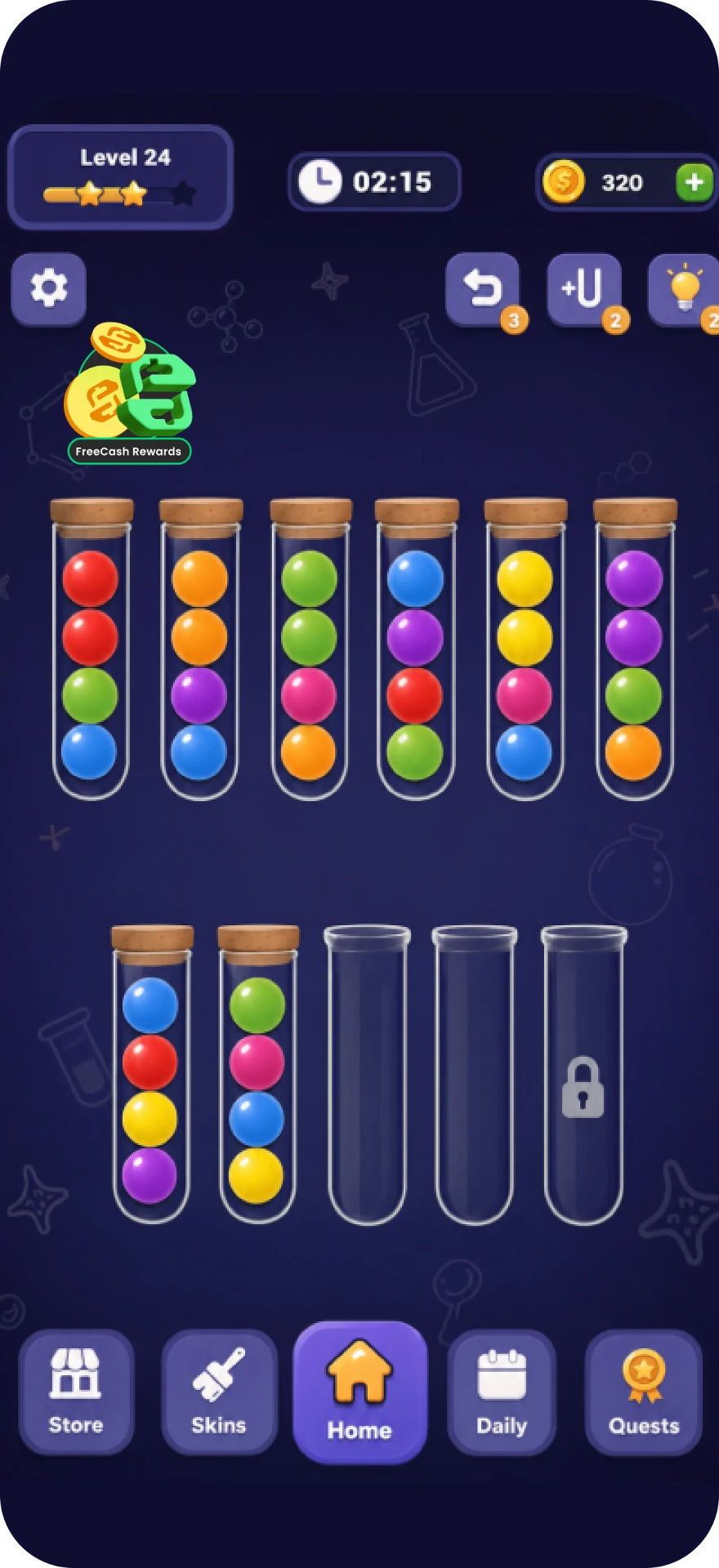
Homescreen · start here
#### Homescreen corner
Every unlinked player passes it every session, and every linked player uses it to reach
Rewarded Progression or the Earn Tab.
-
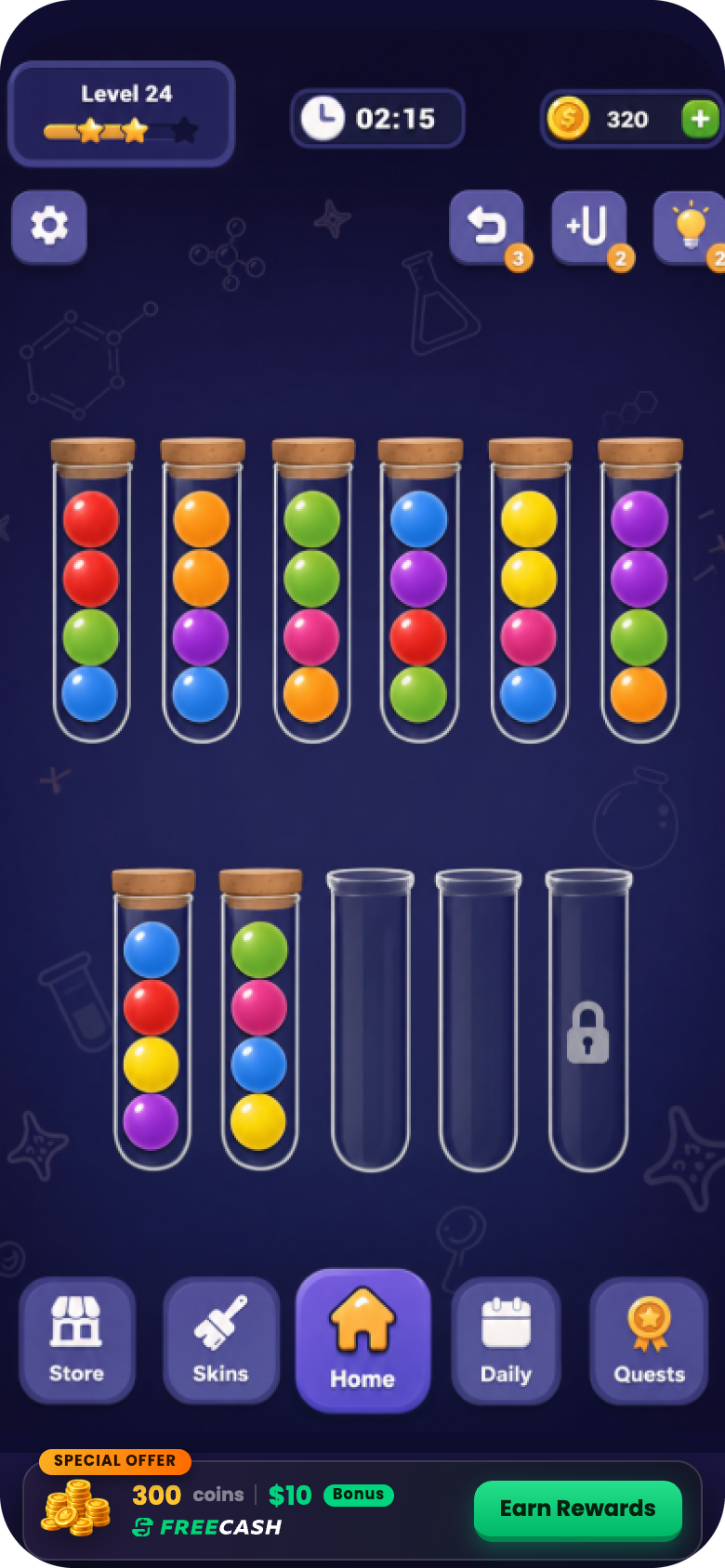
Banner
#### In-game banner
A wide strip docked against the bottom nav, carrying the reward value in text.
-
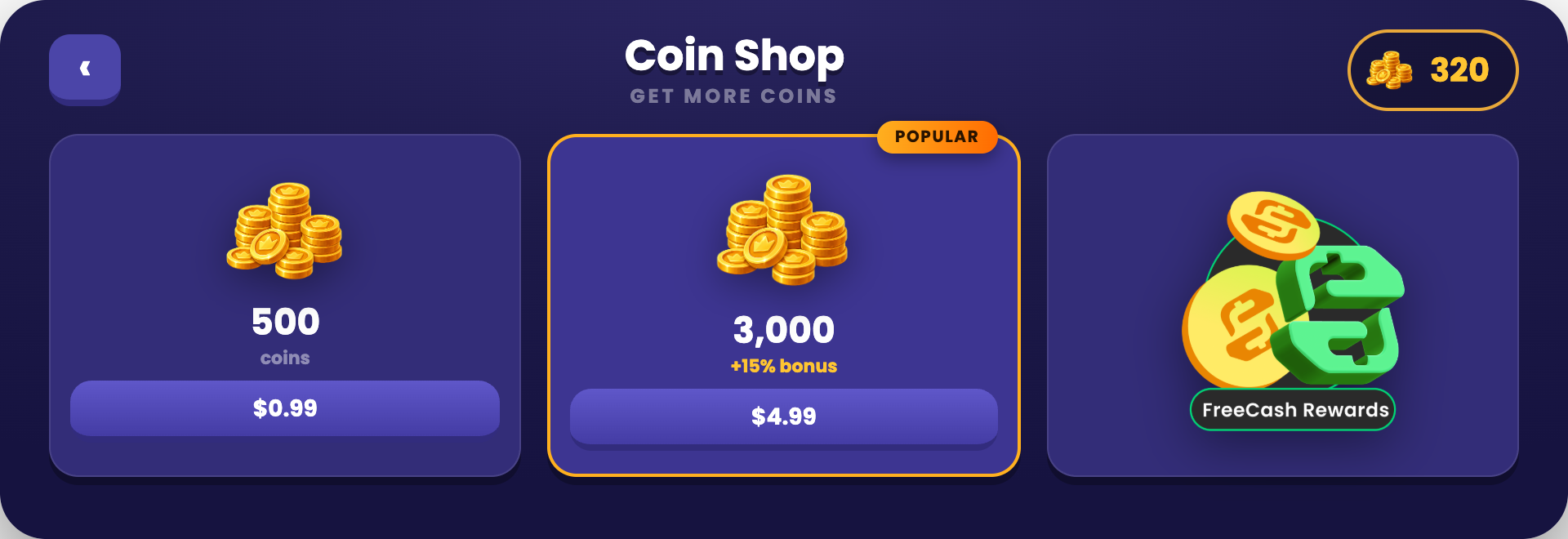
Shop
#### Inside the shop
Sits next to the currency packs, exactly where players already come to get more.
### Have an AI check your entry point
Copy the prompt, paste it into ChatGPT, Claude or Gemini with a screenshot of your homescreen. It asks the questions a screenshot can't answer, then scores your entry point against this guide.
> **Read the entry point audit prompt**
>
> ```text theme={"theme":{"light":"github-light","dark":"night-owl"}}
> You are auditing the persistent Freecash Link entry point (the homescreen icon) inside a mobile game against Almedia's Link best practices. Your job is to tell the team exactly what is wrong with their entry point and how to fix it.
>
> ## Step 1: get the visual
>
> If no screenshot is attached to this message, ask for it now and wait. Say exactly what you need:
> - A full screenshot of the game homescreen with the entry point visible in place, not the icon file on its own.
> - A close-up of the icon itself.
> - If the entry point also lives in the shop or as a banner, a screenshot of that too.
>
> Do not audit anything until you have it.
>
> ## Step 2: ask what a picture cannot answer
>
> Once you have the visual, ask these questions in one short numbered batch and wait for the answers:
>
> 1. Where exactly does the entry point sit? (Homescreen corner, shop, banner, menu, somewhere else?)
> 2. Is it visible permanently to every player who has not linked yet, or only during certain sessions or after a level gate?
> 3. Does it stay visible after the player has linked?
> 4. After linking, what does tapping it open: Rewarded Progression, the Earn Tab, or the Freecash app?
> 5. Does it carry an attention cue: a red notification badge, an animation, or a colour highlight that separates it from ordinary shop buttons?
> 6. Do you fire a reward notification badge when a milestone is reached?
> 7. Does the player ever have to open a menu, settings screen or sub-page to reach it?
> 8. Is the frame around it built in your game's own art style?
>
> ## Step 3: check against these rules
>
> **The icon itself**
> - A persistent, tappable icon that carries the Freecash mark so it is instantly identifiable.
> - The surrounding frame is styled natively to the game's theme, while the Freecash mark stays intact.
> - A reward signal is on it: cash, coins or a gift cue, so the player knows a reward sits behind it.
> - It draws the eye: a red notification badge on the corner, a subtle animation, or a colour highlight.
> - It has a label. A bare Freecash logo or the plain Freecash app icon used alone reads as a random brand icon and fails.
> - It does not look like just another shop button.
>
> **Placement and lifecycle**
> - Permanently on screen for anyone who has not linked yet, not just for one session.
> - Never buried in a settings menu, an overflow menu or a sub-page.
> - Good placements: the homescreen corner first, or inside the shop next to the currency packs, or a wide in-game reward banner carrying the reward value in text.
> - It stays visible after linking as well. This is load bearing: it is the route into Rewarded Progression and the Earn Tab, so hiding it after linking cuts off both the LTV feature and the revenue feature.
> - Badged with a red "1" on every milestone the player achieves, via a reward notification.
> - Any reward cue on the icon or banner names an exact in-game amount, never a vague line like "Real Rewards". The only dollar figure allowed anywhere is the $10 sign-up bonus.
>
> **Why it matters**
> - Most players do not link on the first pop-up. The persistent icon carries the long tail of links, which is a large share of total linked users and therefore of the LTV lift.
>
> ## Hard rule on money wording
>
> There is exactly ONE dollar figure allowed anywhere on the pop-up or entry point: the **$10 sign-up bonus**. Nothing else may carry a dollar amount.
>
> - Never recommend adding a second money number, for example "$5 in Gift Cards", "Earn $50 a month", "$2 cash back" or a payout total.
> - Vague reward wording like "Real Rewards" is fixed by naming the reward type and its exact in-game amount ("500 Coins", "3 Gems"), not by attaching a dollar value.
> - Payout options (cash, gift cards, PayPal, Visa, Amazon) appear as logos or plain labels with NO amounts attached.
> - If the material shows more than one dollar figure, mark it a fail and instruct the team to remove every dollar amount except the $10 sign-up bonus.
>
> ## Rules for you, the assistant
>
> - Never start the audit before you have the visual material. If it is missing, ask for it and stop.
> - Never guess. If something cannot be judged from the screenshot or the answers, mark it "Cannot tell" and say exactly what you would need to see.
> - Do not invent rules beyond the ones listed above. These rules come from Almedia's published Link best practices.
> - Never propose a second dollar figure. The $10 sign-up bonus is the only monetary number allowed.
> - Write for a design or product manager: plain language, no code, no SDK details.
>
> ## Output format
>
> 1. **Scorecard**: a table with three columns, Rule | Pass / Fail / Cannot tell | What you can see.
> 2. **Fix list**: every failed rule as a concrete change, ranked by impact on install-to-link rate and LTV. One sentence each, written as an instruction ("Move the pop-up to fire at minute 3 of the first session").
> 3. **Copy check**: quote the exact wording currently used on the CTA and the reward lines, and give the replacement wording where it breaks a rule.
> 4. **One-line verdict**: how far this integration is from the strongest setup, and the single highest-impact change.
> 5. Close with: full guide at https://dev.almedia.co/overview/best-practices and "Send your setup to link@almedia.co for a human review."
> ```
## Outcome 02 · How to maximize LTV with Rewarded Progression
SDK 1.1+ needed
Rewarded Progression lives inside your game. The player sees their progress and their rewards
without ever opening Freecash, which is what keeps them playing and cuts churn.
### User flow after linking
Pay out loud, then show them where the progression lives.
### Badge every milestone
A reward notification is what pulls the player back into progression.
Bonus tip
Badge the icon with a red “1” on every milestone the user achieves, using a reward
notification. [Technical guide for this](https://github.com/almedia-tm/almedia-sdk/blob/main/Documentation~/integration-guide.md#reward-notifications)
## Outcome 03 · How to maximize revenue with the Earn Tab
SDK 1.1+ needed
The Earn Tab pays you a \$3 CPA for every completed offer. It is an additional feature for
already-linked users.
### User flow for the Earn Tab
Players will not find the Earn Tab on their own, so it gets its own launch moment: a dedicated
pop-up, one short tutorial, then the same Freecash homescreen icon as the permanent way back.
### Earn Tab pop-up
Same rules as the link pop-up: exact reward stated, one CTA, no wall of text.
Do
Don't
Launching the Earn Tab
Fill in the short Earn Tab survey so we have every asset we need to set it up for you.
[Start the Earn Tab survey](https://link-asset-hub.lovable.app/earn-tab-survey)
## Full user flow from start to end
The whole journey in one recording: the pop-up firing in the first session, the link and Freecash
sign-up, back into the game for the in-game payout, the homescreen icon, and finally Rewarded
Progression.
## Checklist
Every box ticked is the strongest setup we know of today for install-to-link rate and LTV per
linked player. Each core box is worth 10 Link Coins; the Earn Tab is a bonus stage worth 15 a box.
/ Link Coins
core + bonus
Submit your integration. We will give you feedback.
Send us your Link setup and we will review it against everything on this page. Running your own
A/B tests? Send those results too.
[Submit your integration](https://link-asset-hub.lovable.app/survey)
Questions: [link@almedia.co](mailto:link@almedia.co)
This documentation is built and hosted on [Mintlify](https://mintlify.com), a developer documentation platform.